Purchase Request System (PRS) Requirements
Description
The PRS application allows company employees to submit requests to purchase products needed to do their job. Adding products to a request works like adding items to a cart in an online store. Once the employee finishes adding products they submit the request for approval.
Users with Reviewer authority can review all submitted requests and decide whether to approve or reject each one.
All primary tables also support full CRUD maintenance.
Demo
Backend — Prs.Api
Tech Stack
| Layer | Technology |
|---|---|
| Back end | ASP.NET Core 8 Web API, Entity Framework Core (code-first), SQL Server |
| Password hashing | BCrypt.Net-Next (cost factor 11) — hashes stored at 60 chars |
Project Structure
Prs.Api/
  Controllers/          # One controller per entity — all CRUD + custom endpoints
    UsersController.cs
    VendorsController.cs
    ProductsController.cs
    RequestsController.cs
    RequestLinesController.cs
  Data/
    PrsDbContext.cs     # EF Core DbContext — registers all DbSets
  Models/               # One C# class per entity + status constants
    User.cs
    Vendor.cs
    Product.cs
    Request.cs
    RequestLine.cs
    RequestStatus.cs    # Static class: New, Review, Approved, Rejected string constants
  Migrations/           # Auto-generated by EF Core — do not edit manually
  Program.cs            # App startup: DI, CORS, middleware, route mapping
Getting Started (Backend)
Follow these steps in order to stand up the API and confirm it works. You write the C# models and controllers — the database schema and the tables are created for you by EF Core, not by running SQL scripts.
-
Set the connection string. In
Prs.Api/appsettings.json, point the connection string at your SQL Server instance and the database namedPrsDbC40. The database does not need to exist yet — the next step creates it. -
Create the schema with migrations. In Visual Studio's Package Manager Console, run:
Add-Migration generates a C# migration from your models; Update-Database
applies it, creating the PrsDbC40 database and every table. You do not run
the CREATE TABLE SQL yourself — EF Core generates the schema from the C#
models. (The CREATE TABLE statements later in this document are reference
only; see the note under Database Schema.)
-
Seed the data. Run
populate-prs.sqlin SQL Server Management Studio. This script only inserts rows (it contains noCREATE TABLE) — so run it afterUpdate-Databasehas created the tables. It seeds 50 vendors, 50 products, 50 users, and 8 sample requests with line items so the Requests screens and endpoints have data to show on first run. You'll still create your own requests through the app's workflow during the capstone. Every seed account's password is the plaintexttest1234(stored as a bcrypt hash), so you can sign in while testing. -
Run the API. Start
Prs.Api(F5 in Visual Studio, ordotnet run) and note the port it listens on. -
Verify with Insomnia. Import the collection
prs-insomnia.json, then set thebaseUrlenvironment variable to your API's address (e.g.https://localhost:7234). Run every request in every folder and check the Tests tab on each. No login is required first — every endpoint is open. Your backend capstone is complete when every request shows green in the Tests panel — a wall of green means your backend matches the contract. If anything is red, open that controller and compare it against the conventions in this document.
Data Model
The back end uses a code-first approach. Models are C# classes; EF Core generates the schema. ? in the Notes column means the property is nullable.
User
| Property | Type | Notes |
|---|---|---|
| Id | int | PK, auto-increment |
| Username | string | max 30, required, unique |
| Password | string | max 60, required — bcrypt hash, never display |
| FirstName | string | max 30, required |
| LastName | string | max 30, required |
| Phone | string? | max 12, optional |
| string? | max 255, optional | |
| IsReviewer | bool | grants access to review/approve workflow |
| IsAdmin | bool | grants access to maintain table data |
Vendor
| Property | Type | Notes |
|---|---|---|
| Id | int | PK, auto-increment |
| Code | string | max 30, required, unique |
| Name | string | max 30, required |
| Address | string | max 30, required |
| City | string | max 30, required |
| State | string | max 2, required |
| Zip | string | max 5, required |
| Phone | string? | max 12, optional |
| string? | max 255, optional |
Product
| Property | Type | Notes |
|---|---|---|
| Id | int | PK, auto-increment |
| PartNumber | string | max 30, required, unique |
| Name | string | max 30, required |
| Price | decimal | (11,2), required |
| Unit | string | max 30, default "Each" |
| PhotoPath | string? | max 255, optional |
| VendorId | int | FK → Vendor |
| Vendor | Vendor? | navigation property — always included in API responses |
Request
| Property | Type | Notes |
|---|---|---|
| Id | int | PK, auto-increment |
| Description | string | max 80, required |
| Justification | string | max 80, required |
| RejectionReason | string? | max 80, set by back end on rejection |
| DeliveryMode | string | max 20, "Pickup", "Delivery", or "Signature Delivery" |
| Status | string | max 10, default "NEW" — managed by back end only |
| Total | decimal | (11,2), default 0 — recalculated by back end after every line item change |
| UserId | int | FK → User |
| User | User? | navigation property |
| RequestLines | ICollection\<RequestLine> | navigation property |
RequestLine
| Property | Type | Notes |
|---|---|---|
| Id | int | PK, auto-increment |
| Quantity | int | default 1 |
| RequestId | int | FK → Request |
| Request | Request? | navigation property — excluded from JSON responses |
| ProductId | int | FK → Product |
| Product | Product? | navigation property |
Database Schema
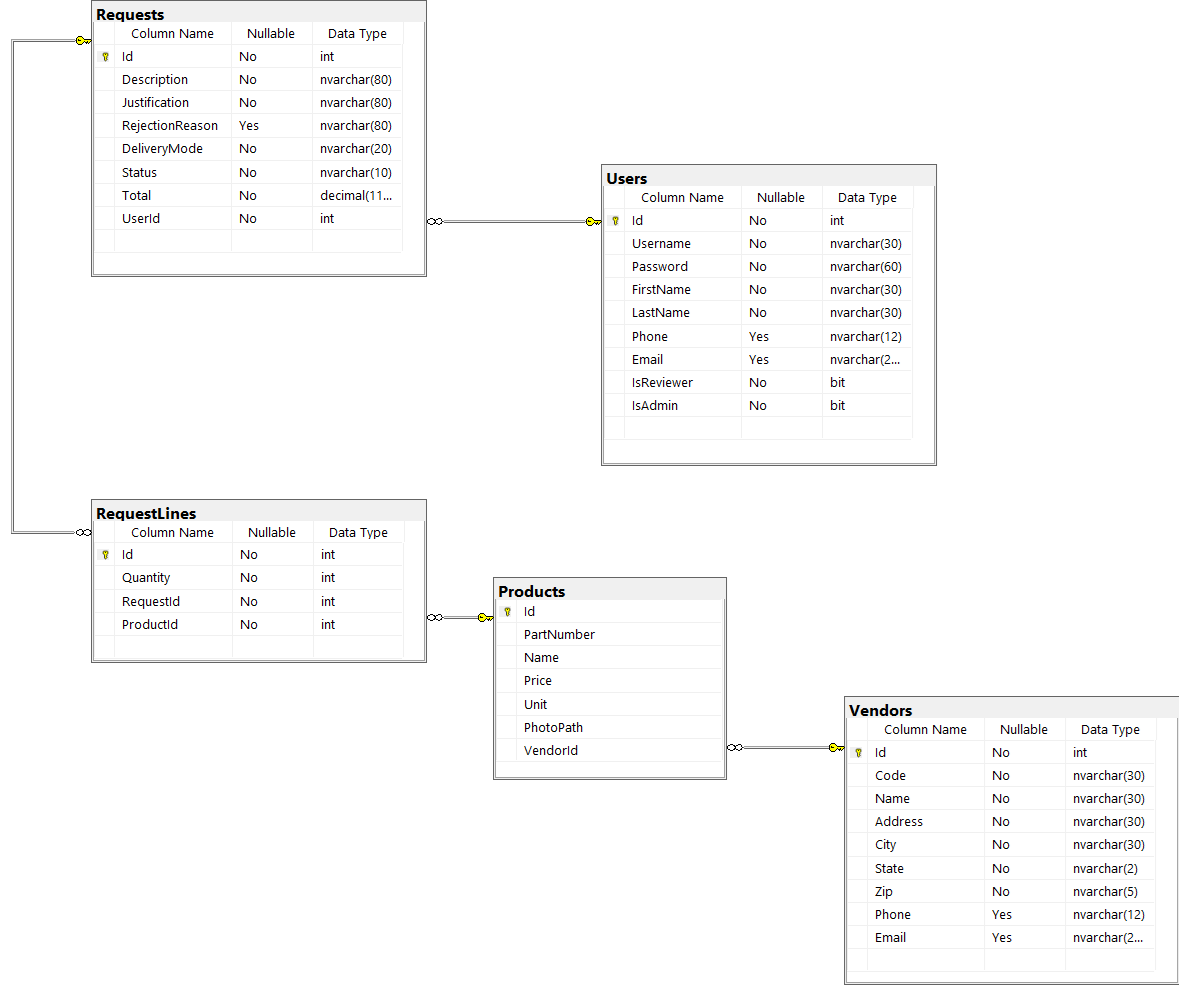
EF Core generates the schema from the C# models using code-first migrations. The SQL Server database is named PrsDbC40 (configurable in appsettings.json).
The
CREATE TABLESQL below is illustrative reference only — do not run it. It shows the schema EF Core produces from your models so you can see the exact column types, keys, and constraints.Add-Migration+Update-Database(see Getting Started) create these tables for you.
Conventions
| Convention | Detail |
|---|---|
| Table names | Plural PascalCase — Users, Vendors, Products, Requests, RequestLines |
| Column names | PascalCase — FirstName, IsReviewer, DeliveryMode, RejectionReason |
| String columns | NVARCHAR — supports Unicode |
| Primary keys | INT IDENTITY(1,1) — auto-increment integer named Id |
| Foreign key columns | {Entity}Id — e.g., UserId, VendorId, ProductId, RequestId |
| FK constraints | Named FK_{ChildTable}_{ParentTable}_{Column}, all with ON DELETE CASCADE |
| Unique constraints | Enforced via unique nonclustered indexes (EF Core [Index(..., IsUnique = true)]), named IX_{Table}_{Column} — not named table constraints |
| Indexes | Auto-generated on every FK column; unique indexes on Users.Username, Vendors.Code, and Products.PartNumber |
Tables
-- Users
CREATE TABLE [dbo].[Users] (
    [Id]         INT           NOT NULL IDENTITY(1,1),
    [Username]   NVARCHAR(30)  NOT NULL,
    [Password]   NVARCHAR(60)  NOT NULL,   -- bcrypt hash
    [FirstName]  NVARCHAR(30)  NOT NULL,
    [LastName]   NVARCHAR(30)  NOT NULL,
    [Phone]      NVARCHAR(12)  NULL,
    [Email]      NVARCHAR(255) NULL,
    [IsReviewer] BIT           NOT NULL,
    [IsAdmin]    BIT           NOT NULL,
    CONSTRAINT [PK_Users] PRIMARY KEY ([Id])
)
CREATE UNIQUE INDEX [IX_Users_Username] ON [dbo].[Users] ([Username])

-- Vendors
CREATE TABLE [dbo].[Vendors] (
    [Id]      INT           NOT NULL IDENTITY(1,1),
    [Code]    NVARCHAR(30)  NOT NULL,
    [Name]    NVARCHAR(30)  NOT NULL,
    [Address] NVARCHAR(30)  NOT NULL,
    [City]    NVARCHAR(30)  NOT NULL,
    [State]   NVARCHAR(2)   NOT NULL,
    [Zip]     NVARCHAR(5)   NOT NULL,
    [Phone]   NVARCHAR(12)  NULL,
    [Email]   NVARCHAR(255) NULL,
    CONSTRAINT [PK_Vendors] PRIMARY KEY ([Id])
)
CREATE UNIQUE INDEX [IX_Vendors_Code] ON [dbo].[Vendors] ([Code])

-- Products (depends on Vendors)
CREATE TABLE [dbo].[Products] (
    [Id]         INT           NOT NULL IDENTITY(1,1),
    [PartNumber] NVARCHAR(30)  NOT NULL,
    [Name]       NVARCHAR(30)  NOT NULL,
    [Price]      DECIMAL(11,2) NOT NULL,
    [Unit]       NVARCHAR(30)  NOT NULL,
    [PhotoPath]  NVARCHAR(255) NULL,
    [VendorId]   INT           NOT NULL,
    CONSTRAINT [PK_Products] PRIMARY KEY ([Id]),
    CONSTRAINT [FK_Products_Vendors_VendorId]
        FOREIGN KEY ([VendorId]) REFERENCES [dbo].[Vendors] ([Id]) ON DELETE CASCADE
)
CREATE UNIQUE INDEX [IX_Products_PartNumber] ON [dbo].[Products] ([PartNumber])

-- Requests (depends on Users)
CREATE TABLE [dbo].[Requests] (
    [Id]              INT           NOT NULL IDENTITY(1,1),
    [Description]     NVARCHAR(80)  NOT NULL,
    [Justification]   NVARCHAR(80)  NOT NULL,
    [RejectionReason] NVARCHAR(80)  NULL,
    [DeliveryMode]    NVARCHAR(20)  NOT NULL,
    [Status]          NVARCHAR(10)  NOT NULL,
    [Total]           DECIMAL(11,2) NOT NULL,
    [UserId]          INT           NOT NULL,
    CONSTRAINT [PK_Requests] PRIMARY KEY ([Id]),
    CONSTRAINT [FK_Requests_Users_UserId]
        FOREIGN KEY ([UserId]) REFERENCES [dbo].[Users] ([Id]) ON DELETE CASCADE
)

-- RequestLines (depends on Requests and Products)
CREATE TABLE [dbo].[RequestLines] (
    [Id]        INT NOT NULL IDENTITY(1,1),
    [Quantity]  INT NOT NULL,
    [RequestId] INT NOT NULL,
    [ProductId] INT NOT NULL,
    CONSTRAINT [PK_RequestLines] PRIMARY KEY ([Id]),
    CONSTRAINT [FK_RequestLines_Requests_RequestId]
        FOREIGN KEY ([RequestId]) REFERENCES [dbo].[Requests] ([Id]) ON DELETE CASCADE,
    CONSTRAINT [FK_RequestLines_Products_ProductId]
        FOREIGN KEY ([ProductId]) REFERENCES [dbo].[Products] ([Id]) ON DELETE CASCADE
)
Business Rules
Auto-Approval
Any request with a total of $50.00 or less is automatically approved when submitted for review — the back end sets status directly to "APPROVED". These requests never appear in the review queue.
Request Status Flow
Status is always set by the back end. The front end triggers transitions only via the workflow endpoints (/review, /approve, /reject).
Roles
- Every person in the User table is a basic user.
- A user can also be a Reviewer and/or an Admin (the two flags are independent).
- Only Reviewers can approve or reject requests.
- A Reviewer may not approve or reject their own requests — the Approve and Reject buttons are disabled on the Detail page when the request belongs to the logged-in user.
- Only Admins can access the CRUD maintenance pages.
Password Security
Passwords are stored as bcrypt hashes (60 characters). The API returns the hashed password in user responses — the front end must strip it immediately after login and never display or store it.
HTTP Response Conventions
| Verb | Success | Not Found | Bad Request |
|---|---|---|---|
| GET | 200 OK | 404 | — |
| POST | 201 Created + body | — | — |
| PUT | 200 OK + body | 404 | 400 |
| DELETE | 204 No Content | 404 | — |
API Quick Reference
| Action | Method | Endpoint | Notes |
|---|---|---|---|
| Login | POST | /api/users/login |
Body: { username, password } |
| Get all users | GET | /api/users |
|
| Get user by ID | GET | /api/users/{id} |
|
| Create user | POST | /api/users |
Returns created user with ID |
| Update user | PUT | /api/users/{id} |
Returns updated user (200 with body) |
| Delete user | DELETE | /api/users/{id} |
|
| Get all vendors | GET | /api/vendors |
|
| Create vendor | POST | /api/vendors |
|
| Update vendor | PUT | /api/vendors/{id} |
Returns updated vendor (200 with body) |
| Delete vendor | DELETE | /api/vendors/{id} |
|
| Get all products | GET | /api/products |
|
| Create product | POST | /api/products |
Returns product with nested vendor |
| Update product | PUT | /api/products/{id} |
Returns updated product (200 with body) |
| Delete product | DELETE | /api/products/{id} |
|
| Get all requests | GET | /api/requests |
|
| Get requests by status | GET | /api/requests?status=REVIEW |
Used for status filter and review queue |
| Create request | POST | /api/requests |
Returns request with nested user |
| Update request | PUT | /api/requests/{id} |
Returns updated request (200 with body) |
| Delete request | DELETE | /api/requests/{id} |
|
| Send for review | PUT | /api/requests/{id}/review |
Sets status to REVIEW (or APPROVED if total ≤ $50) |
| Approve request | PUT | /api/requests/{id}/approve |
Sets status to APPROVED |
| Reject request | PUT | /api/requests/{id}/reject |
Body: plain rejection reason string; sets status to REJECTED |
| Get all line items | GET | /api/requestlines |
Returns every line item — GetAll has no filter parameter, so a ?requestId= query string is ignored server-side. The front end never calls this endpoint; line items are always obtained from the nested requestLines array on GET /api/requests/{id} |
| Create line item | POST | /api/requestlines |
Recalculates request total; returns item with navigation properties |
| Update line item | PUT | /api/requestlines/{id} |
Recalculates request total; returns updated item (200 with body) |
| Delete line item | DELETE | /api/requestlines/{id} |
Recalculates request total |
Frontend — Prs.Web
Tech Stack
| Layer | Technology |
|---|---|
| Front end | React 18, TypeScript, Vite, react-hook-form, react-router-dom, Bootstrap |
| API base URL | http://localhost:5555/api |
Project Structure
The app shell and router live at the root of src/. All feature code lives in a feature folder named after the entity (plural for pages, singular for interfaces).
src/
  # App shell
  main.tsx              # Router definition — all routes declared here
  App.tsx               # Root component — UserContext provider, Toaster
  Layout.tsx            # Shared layout: Header + AppNav + <Outlet>
  AppNav.tsx            # Left sidebar nav links
  Header.tsx            # Top bar: logo, signed-in user dropdown, sign-in button
  IndexPage.tsx         # Redirect-only: → /signin or /requests
  ErrorPage.tsx         # React Router error boundary
  App.css

  # Feature folders — one per entity
  account/
    SignInPage.tsx

  requests/
    IRequest.ts         # TypeScript interface
    RequestAPI.ts       # Fetch wrappers: list, find, post, put, delete, review, approve, reject
    RequestsPage.tsx    # List page (route target)
    RequestTable.tsx    # Table + status filter dropdown
    RequestRow.tsx      # Single table row with three-dots dropdown
    RequestCreatePage.tsx
    RequestEditPage.tsx
    RequestForm.tsx     # Shared form used by create and edit pages
    RequestDetailPage.tsx  # Detail view + items table + workflow buttons
    RequestHeader.tsx   # Read-only summary display (description, status, etc.)

  requestLines/
    IRequestLine.ts
    RequestLineAPI.ts
    RequestLineCreatePage.tsx
    RequestLineEditPage.tsx
    RequestLineForm.tsx    # Shared form: product dropdown, price/amount display, quantity
    RequestLineTable.tsx   # Items card with table, Add a line button, running total

  products/
    IProduct.ts
    ProductAPI.ts
    ProductsPage.tsx
    ProductList.tsx
    ProductCard.tsx
    ProductCardSkeleton.tsx   # Loading placeholder shown while fetching
    ProductCreatePage.tsx
    ProductEditPage.tsx
    ProductForm.tsx

  vendors/
    IVendor.ts
    VendorAPI.ts
    VendorsPage.tsx
    VendorList.tsx
    VendorCard.tsx
    VendorCardSkeleton.tsx
    VendorCreatePage.tsx
    VendorEditPage.tsx
    VendorForm.tsx

  users/
    IUser.ts
    UserAPI.ts
    UsersPage.tsx
    UserList.tsx
    UserCard.tsx
    UserCreatePage.tsx
    UserEditPage.tsx
    UserForm.tsx

  utility/
    fetchUtilities.ts   # BASE_URL constant, checkStatus and parseJSON fetch helpers
    formatUtilities.ts  # formatPhoneNumber, getTextBackgroundByStatus (badge colors)

  assets/
    bootstrap-icons.svg
Feature Folder Pattern
Each entity's folder follows this consistent pattern:
| File | Role |
|---|---|
I{Entity}.ts |
TypeScript interface — the shape of the entity object |
{Entity}API.ts |
All fetch calls for that entity (list, find, post, put, delete) |
{Entity}sPage.tsx |
Route target — page heading, create button, renders the list component |
{Entity}List.tsx / {Entity}Table.tsx |
Renders the full collection |
{Entity}Card.tsx / {Entity}Row.tsx |
Renders one item (card grid or table row) with the three-dots action dropdown |
{Entity}Form.tsx |
Shared form component — handles both create (no id) and edit (id in params) |
{Entity}CreatePage.tsx |
Thin wrapper — renders {Entity}Form without an id |
{Entity}EditPage.tsx |
Thin wrapper — reads :id from params and renders {Entity}Form |
RequestDetailPage breaks from the standard pattern because it serves as detail view, line item manager, and workflow action screen in one page.
App Shell
Every page except Sign In is wrapped in a shared layout: a fixed header bar at the top and a left sidebar beneath it.
Header bar — app logo + "Purchase Request System" title (links to /). When signed in: user's first + last name with a dropdown containing Settings, Profile, and Sign out. When signed out: a Sign in button linking to /signin.
Left sidebar — "Purchase" section label followed by nav links:
| Link | Route |
|---|---|
| Requests | /requests |
| Products | /products |
| Vendors | /vendors |
| Users | /users |
Routes Summary
| Route | Page | Notes |
|---|---|---|
/signin |
Sign In | Outside the app shell layout |
/ |
Home | Redirects to /signin if no user is in context, or to /requests if signed in. Renders nothing while the redirect fires. |
/requests |
Requests List | Supports ?status= filter |
/requests/create |
Request Create | |
/requests/edit/:id |
Request Edit | |
/requests/detail/:id |
Request Detail | Also hosts workflow actions and line items |
/requests/detail/:id/requestline/create |
Line Item Create | |
/requests/detail/:id/requestline/edit/:lineId |
Line Item Edit | |
/products |
Products List | |
/products/create |
Product Create | |
/products/edit/:id |
Product Edit | |
/vendors |
Vendors List | |
/vendors/create |
Vendor Create | |
/vendors/edit/:id |
Vendor Edit | |
/users |
Users List | |
/users/create |
User Create | |
/users/edit/:id |
User Edit |
Sign In Page (/signin)
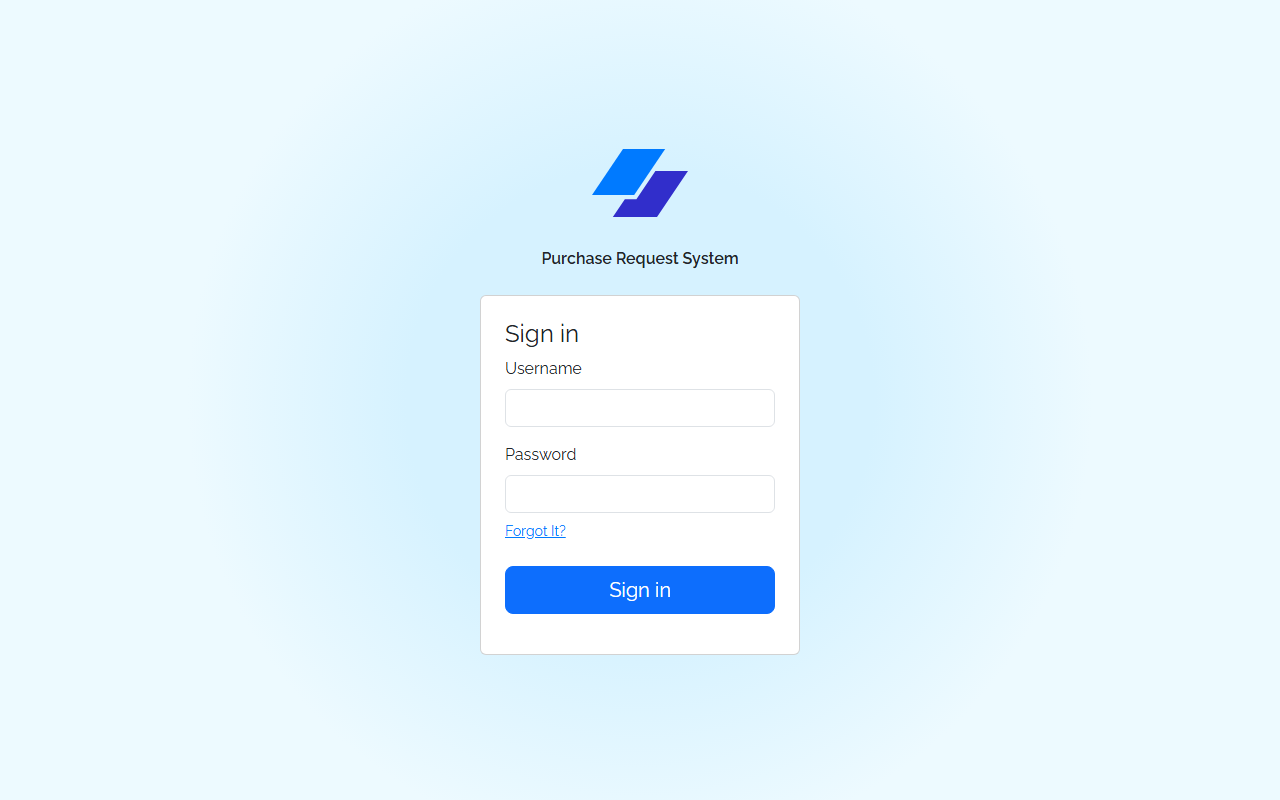
Centered layout with app logo, title, and a card containing:
| Field | Type | Validation |
|---|---|---|
| Username | text | Required |
| Password | password | Required |
A "Forgot It?" link is shown below the password field (placeholder, no functionality required). A full-width Sign in button submits the form.
Endpoint: POST /api/users/login
Request body: { "username": "...", "password": "..." }
On success: strip the password field from the response, persist the rest of the user object to localStorage, set user context, and navigate to /requests.
On failure: display a toast — "Unsuccessful sign in. Please try again."
Requests List (/requests)
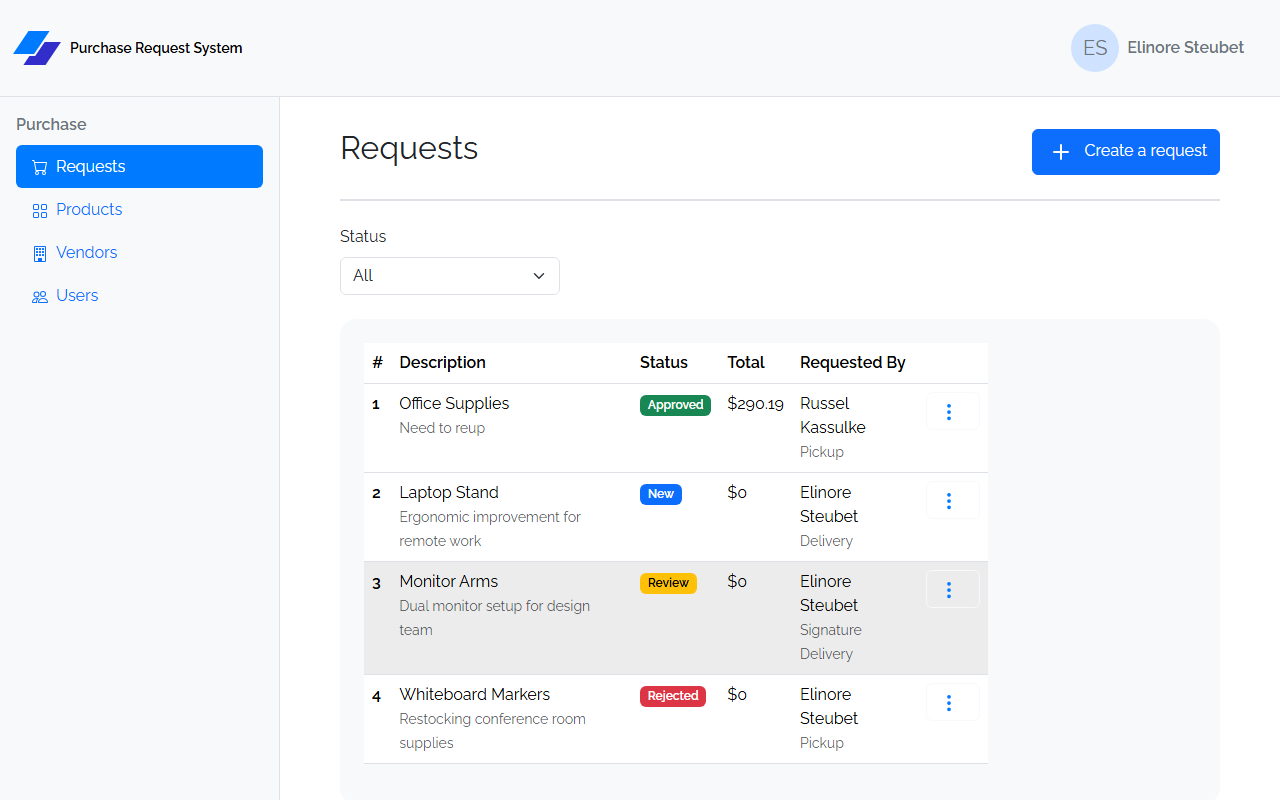
Header: "Requests" heading + Create a request button → /requests/create
Status filter — a dropdown above the table with options All, New, Review, Approved, Rejected. Selecting a value appends ?status={VALUE} to the URL and re-fetches GET /api/requests?status={VALUE}.
Table columns:
| Column | Notes |
|---|---|
| # | request.id |
| Description | Primary text; justification displayed below in secondary style |
| Status | Colored badge |
| Total | Formatted as $N |
| Requested By | First + last name; delivery mode displayed below in secondary style |
| (actions) | Three-dots dropdown: Review → /requests/detail/:id, Edit → /requests/edit/:id, Delete (with confirm dialog) |
Delete removes the row from the list on success and shows a success toast.
Request Create (/requests/create) / Request Edit (/requests/edit/:id)
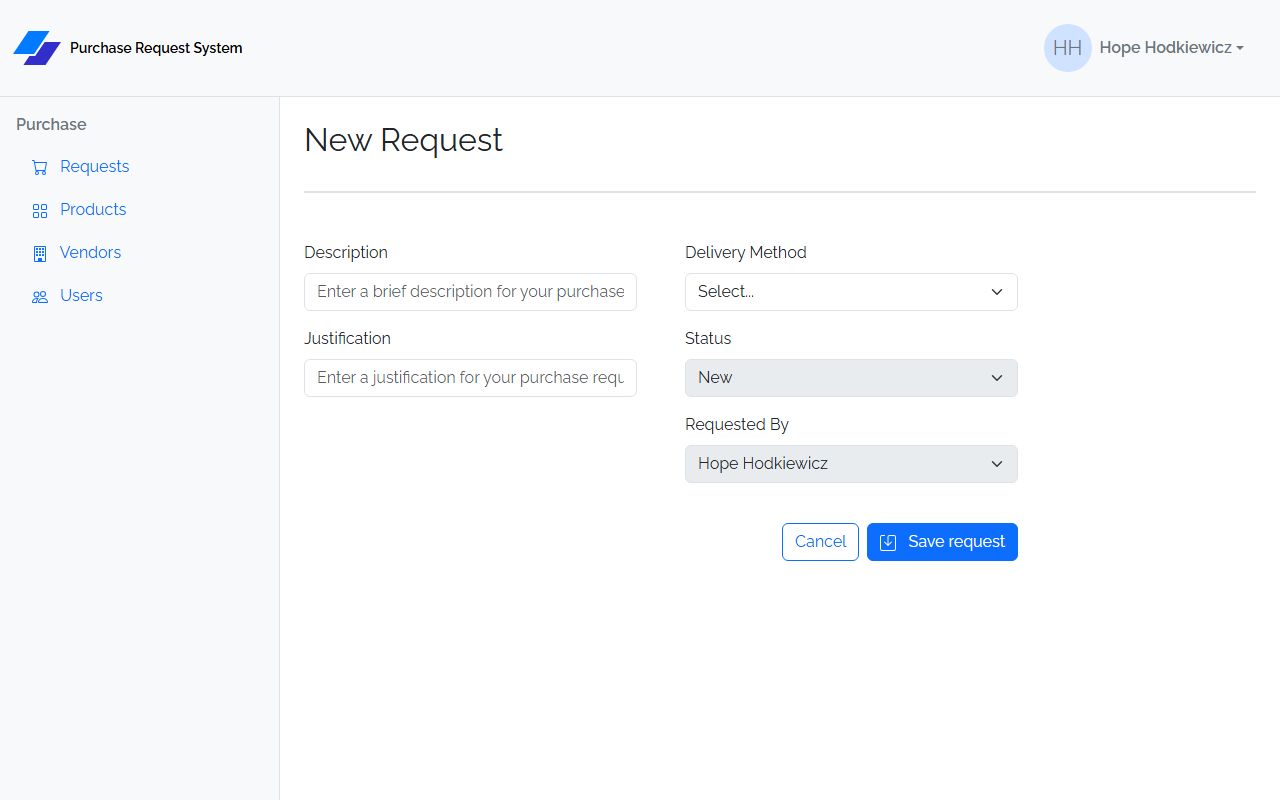
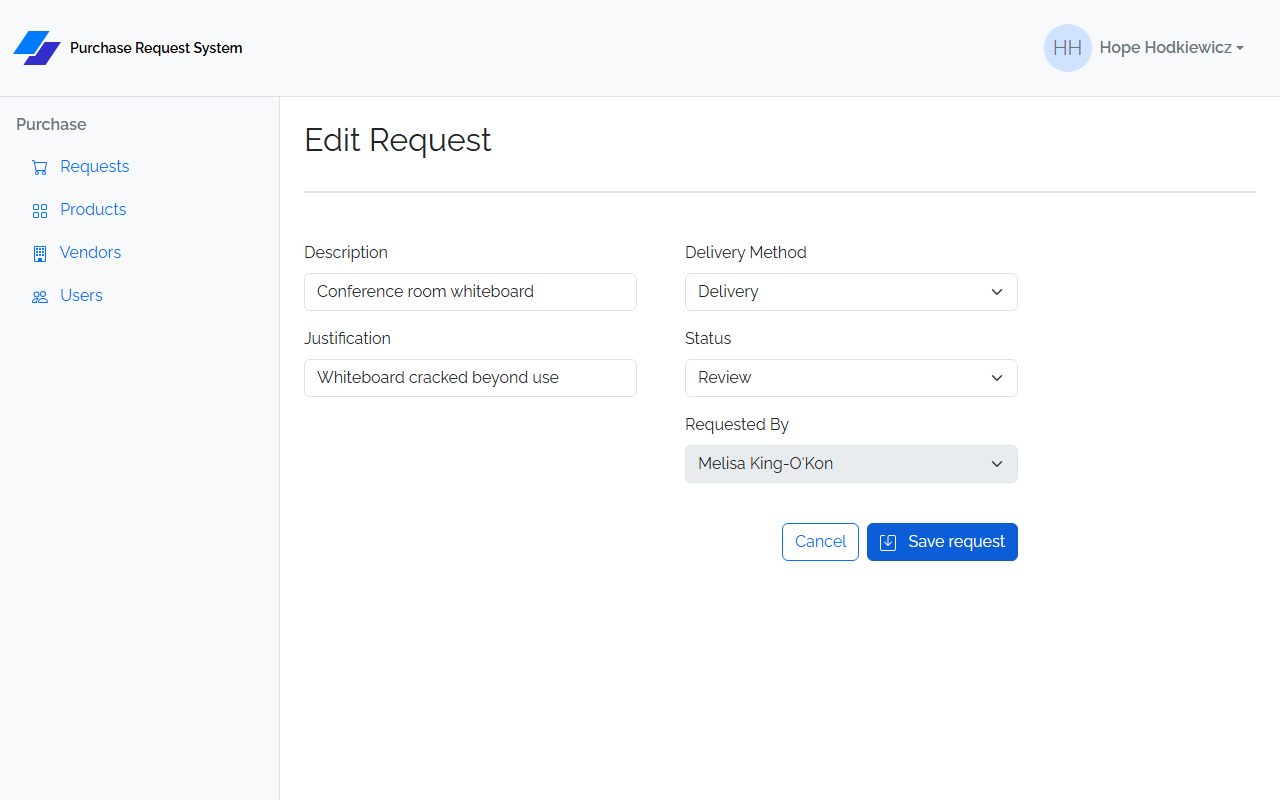
Both pages render the same form. On save, both navigate to /requests/detail/{id}.
Form fields:
| Field | Input | Validation |
|---|---|---|
| Description | text | Required |
| Justification | text | Required |
| Delivery Method | select | Required; options: Pickup, Delivery, Signature Delivery |
| Status | select | Required; options: New, Review, Approved, Rejected; disabled on Create, editable on Edit |
| Requested By | select | Always disabled; pre-populated from the logged-in user's ID |
On Create: POSTs to POST /api/requests, then redirects to the new request's detail page.
On Edit: PUTs to PUT /api/requests/:id, then redirects to the request's detail page.
Request Detail (/requests/detail/:id)
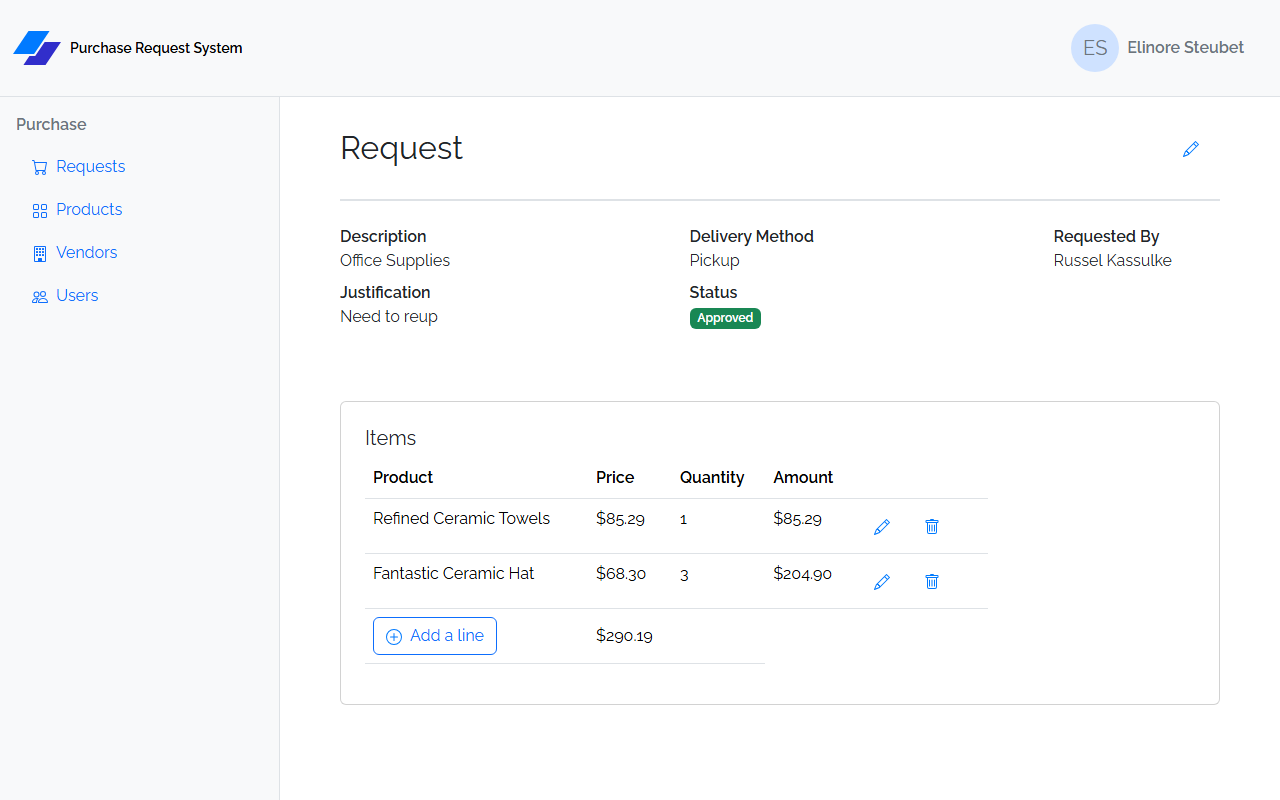
The central screen for a request. Combines the detail view, line item management, and all workflow actions on one page.
Page header row — "Request" heading on the left; workflow buttons on the right (see below); Edit (pencil icon) link to /requests/edit/:id always present.
Request summary — three definition-list columns:
| Column 1 | Column 2 | Column 3 |
|---|---|---|
| Description | Delivery Method | Requested By (first + last name) |
| Justification | Status (colored badge) | Rejection Reason (only shown if present) |
Workflow buttons — conditional on request.status:
| Status | Buttons shown |
|---|---|
NEW |
Send for Review |
REVIEW |
Approve + Reject (both disabled if request belongs to logged-in user; warning alert is shown) |
APPROVED / REJECTED |
(no workflow buttons) |
Items table (card titled "Items"):
| Column | Notes |
|---|---|
| Product | Product name |
| Price | Formatted as currency |
| Quantity | |
| Amount | Price × Quantity, formatted as currency |
| (actions) | Edit (pencil) → /requests/detail/:id/requestline/edit/:lineId; Delete (trash, with confirm dialog) |
Table footer: Add a line button → /requests/detail/:id/requestline/create; running total formatted as currency (calculated client-side from line items).
Send for Review
PUT /api/requests/{id}/review — sets status to REVIEW (or auto-approves to APPROVED if total ≤ $50). Navigates to /requests on success.
Approve
PUT /api/requests/{id}/approve — sets status to APPROVED. Navigates to /requests on success.
Reject
Opens a Bootstrap modal with:
- Rejection Reason — textarea; required; inline error shown if submitted empty
- Cancel button (closes modal without saving)
- Save button — calls PUT /api/requests/{id}/reject with the reason as a plain string body (not JSON-wrapped). Sets status to REJECTED. Closes modal and navigates to /requests on success.
Line Item Create / Edit
Create: /requests/detail/:id/requestline/create
Edit: /requests/detail/:id/requestline/edit/:lineId
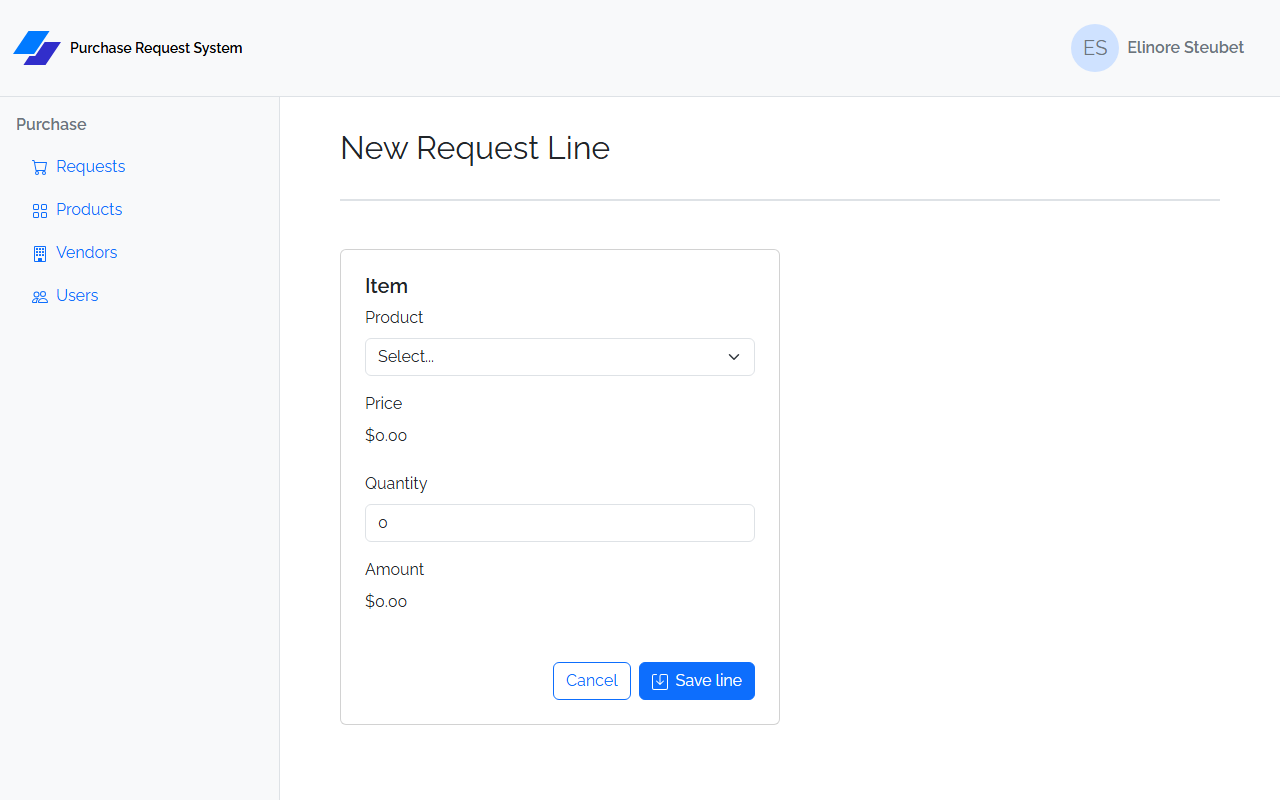
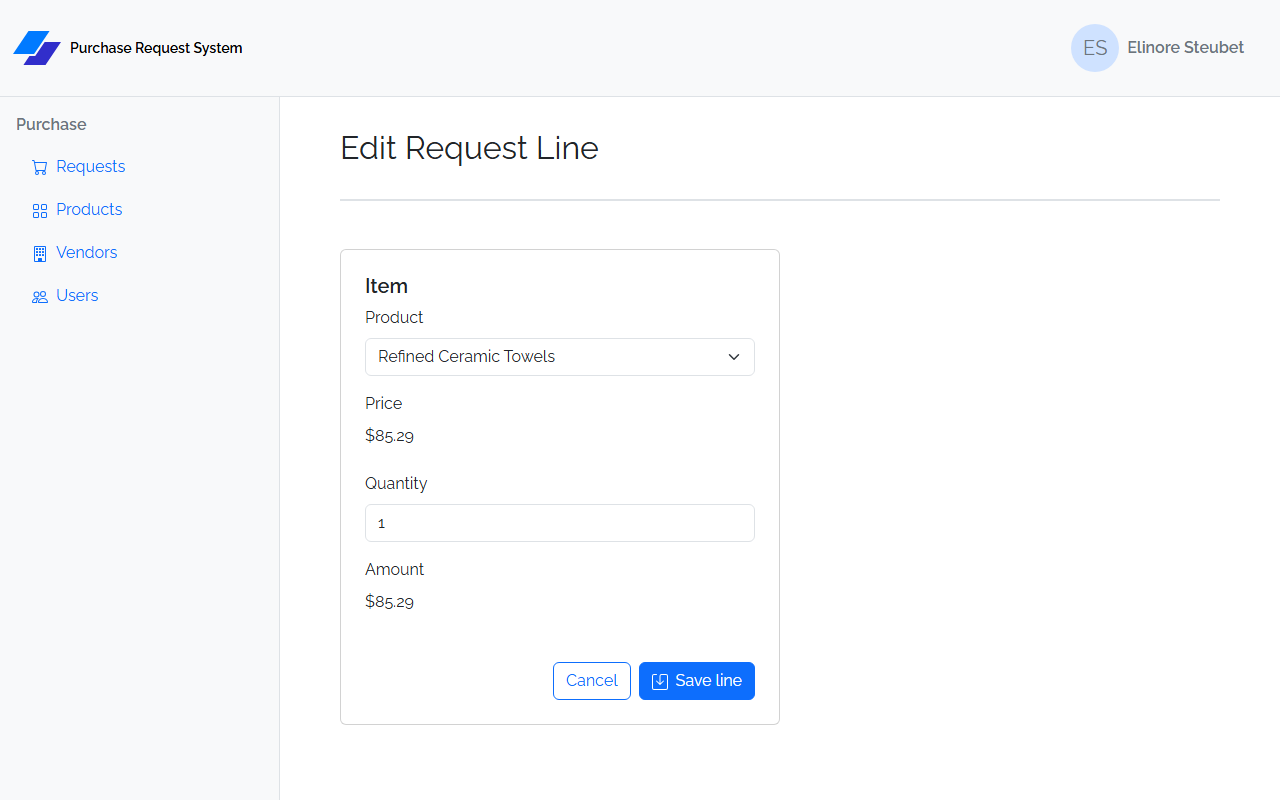
Both use the same form page (card titled "Item"):
| Field | Input | Validation |
|---|---|---|
| Product | select | Required; loaded from GET /api/products; displays product name |
| Price | read-only display | Auto-populated from selected product; formatted as currency; no user input |
| Quantity | number | Required; minimum 1 |
| Amount | read-only display | Price × Quantity, recalculated client-side on product/quantity change; formatted as currency; no user input |
Cancel navigates back to /requests/detail/:id.
On save: POSTs or PUTs the line item. The back end recalculates and updates request.total. The POST/PUT response includes nested product (with vendor) navigation properties. Redirects to /requests/detail/{requestId} on success.
Products List (/products)
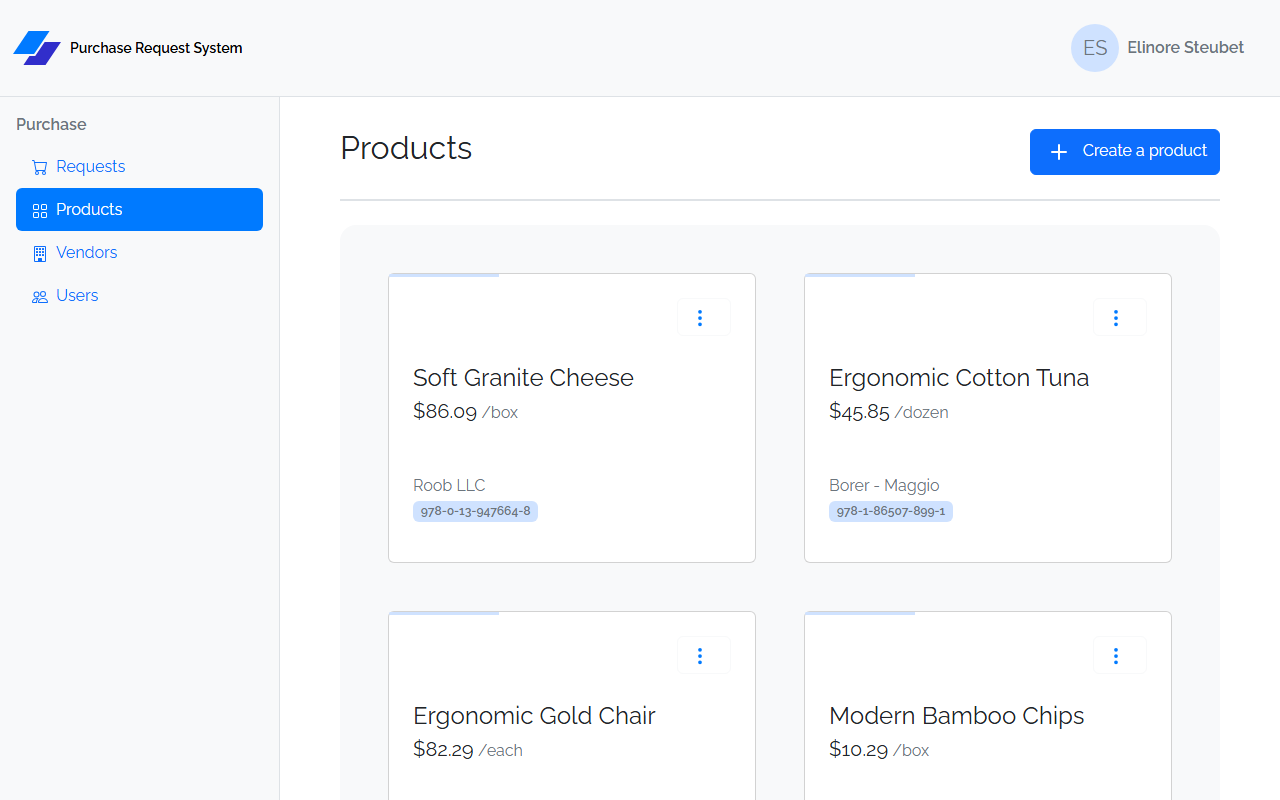
Header: "Products" heading + Create a product button → /products/create
Displays products as a card grid (not a table). Each card shows:
- Product name (large)
- Price / unit (e.g., $12.99 /each)
- Vendor name (bottom of card)
- Part number (badge)
- Three-dots dropdown: Edit → /products/edit/:id, Delete (with confirm dialog)
Product Create (/products/create) / Product Edit (/products/edit/:id)
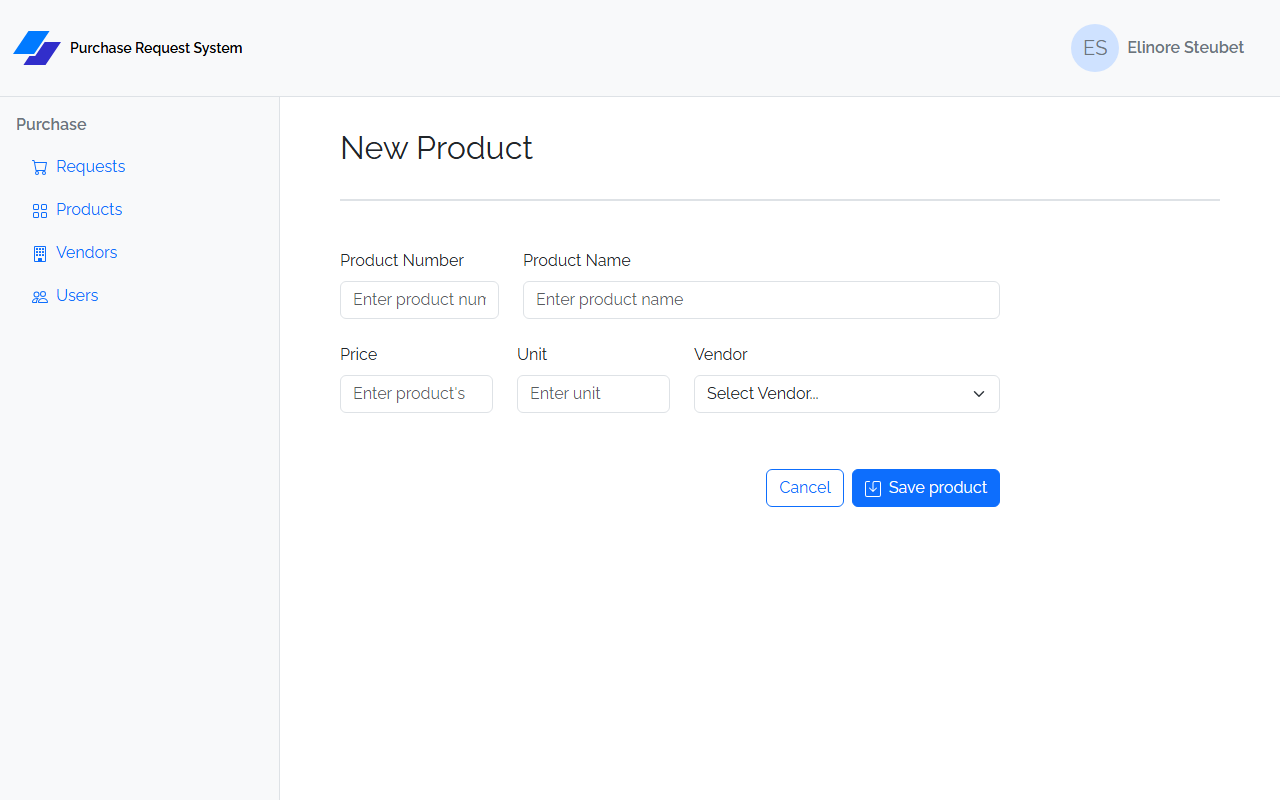
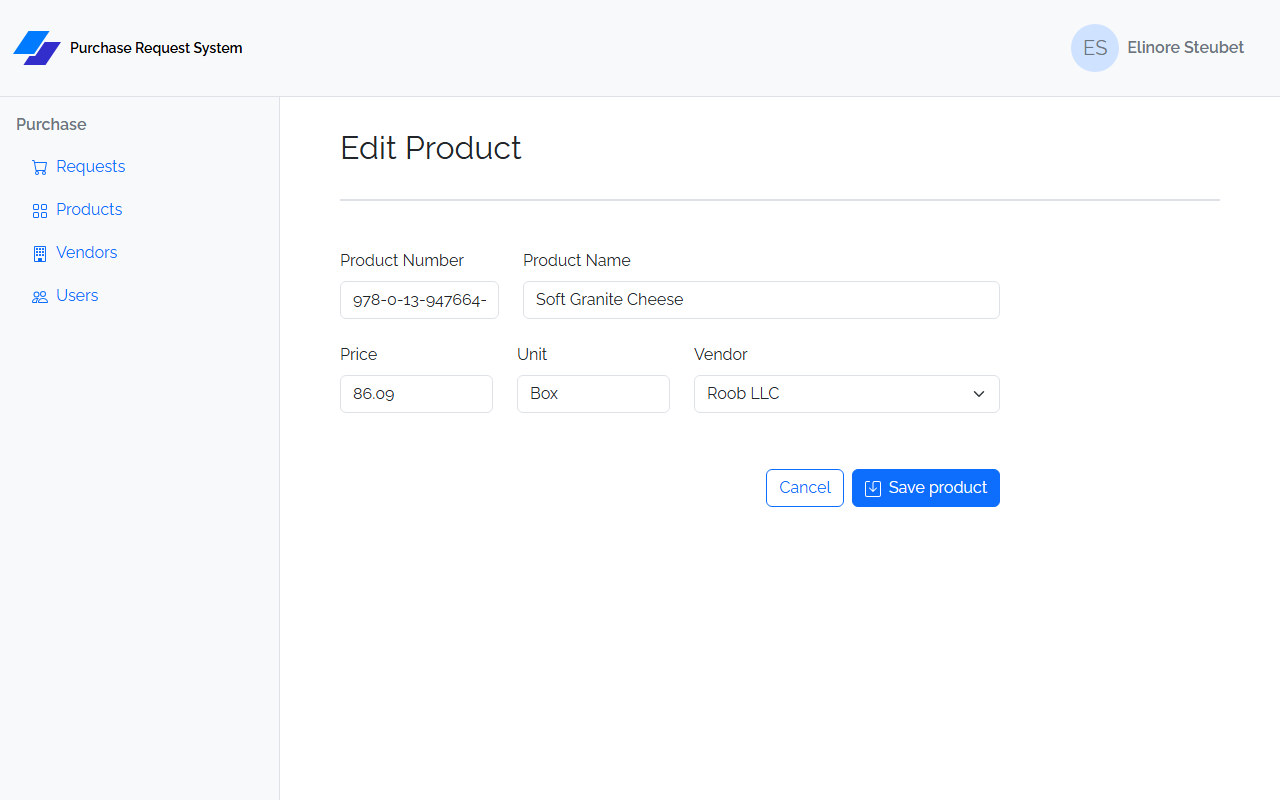
| Field | Input | Validation |
|---|---|---|
| Product Number | text | Required; max 20 characters |
| Product Name | text | Required |
| Price | number | Required; step="0.01" (allows decimals) |
| Unit | text | Required |
| Vendor | select | Required; loaded from GET /api/vendors |
On save: navigates to /products. POST returns the product with nested vendor; no refetch needed.
Vendors List (/vendors)
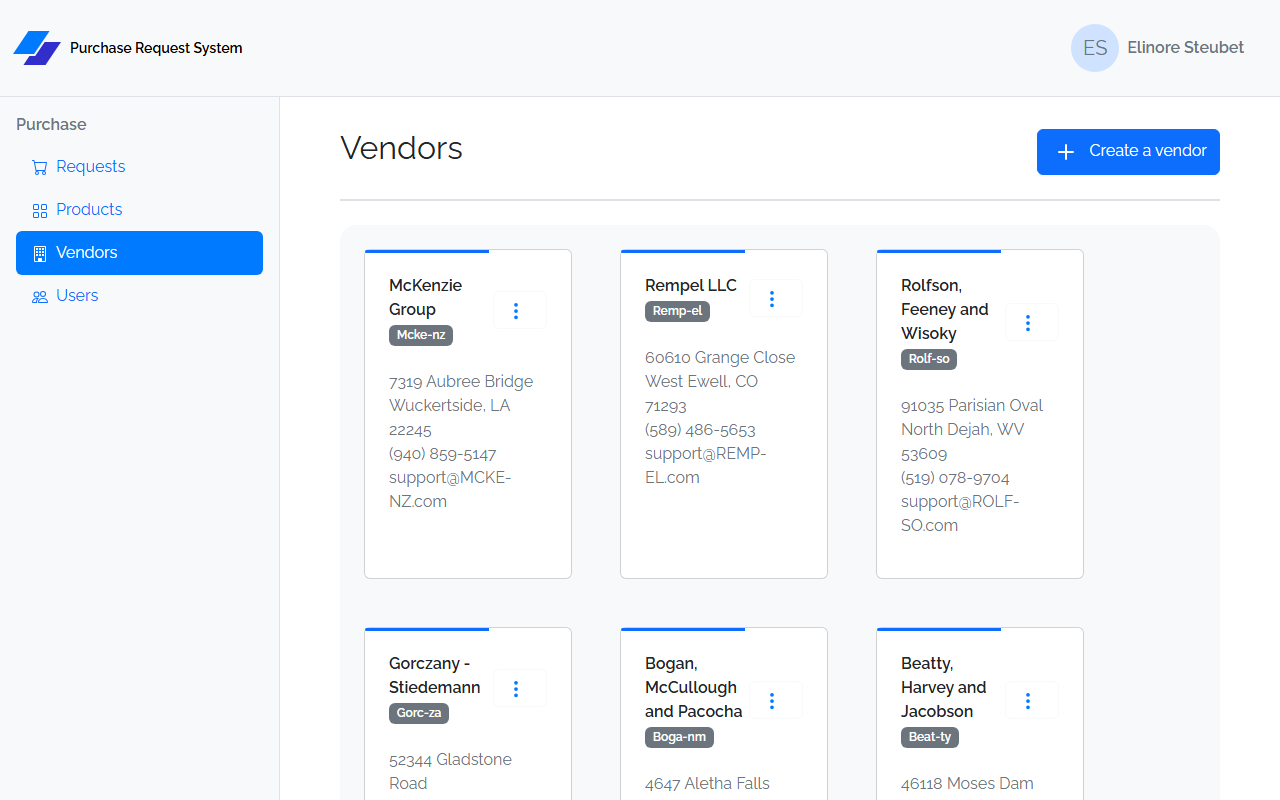
Header: "Vendors" heading + Create a vendor button → /vendors/create
Displays vendors as a card grid. Each card shows:
- Vendor name + code badge
- Address, City / State / Zip
- Phone (formatted)
- Email
- Three-dots dropdown: Edit → /vendors/edit/:id, Delete (with confirm dialog)
Vendor Create (/vendors/create) / Vendor Edit (/vendors/edit/:id)
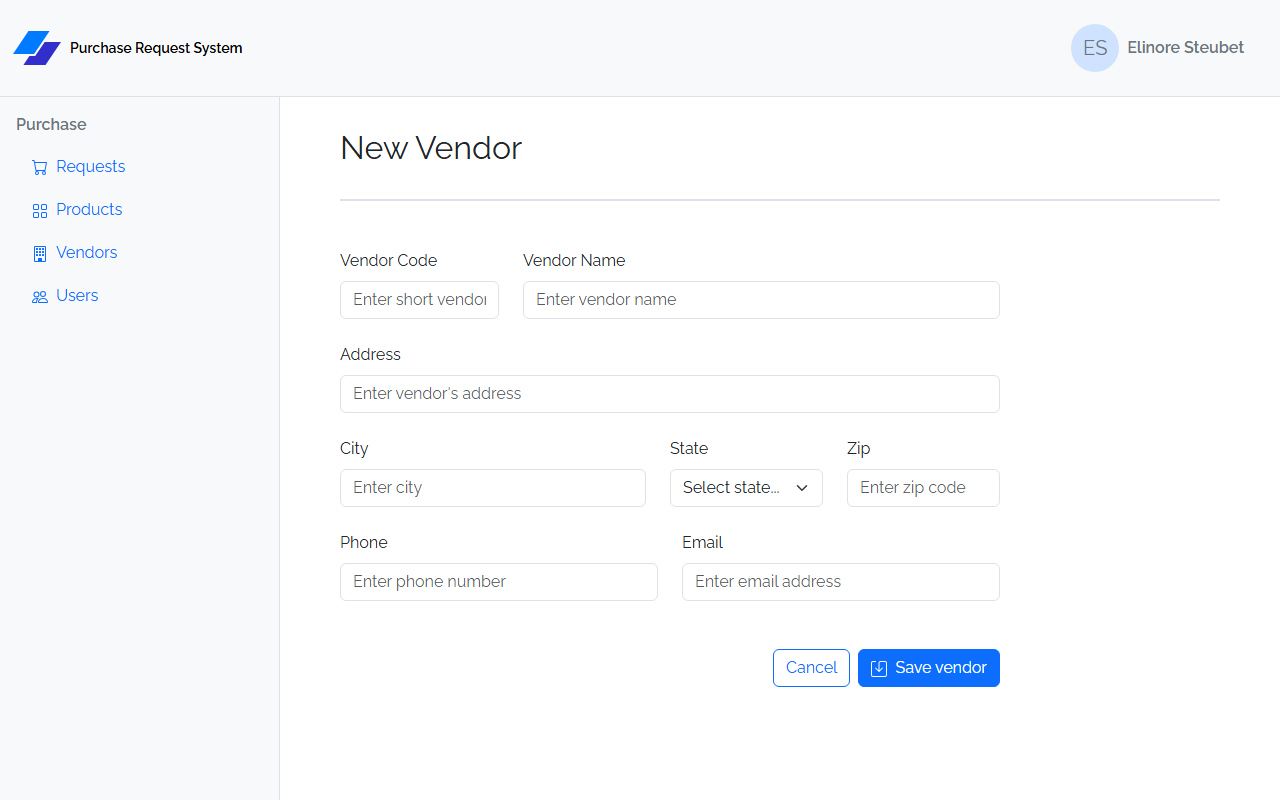
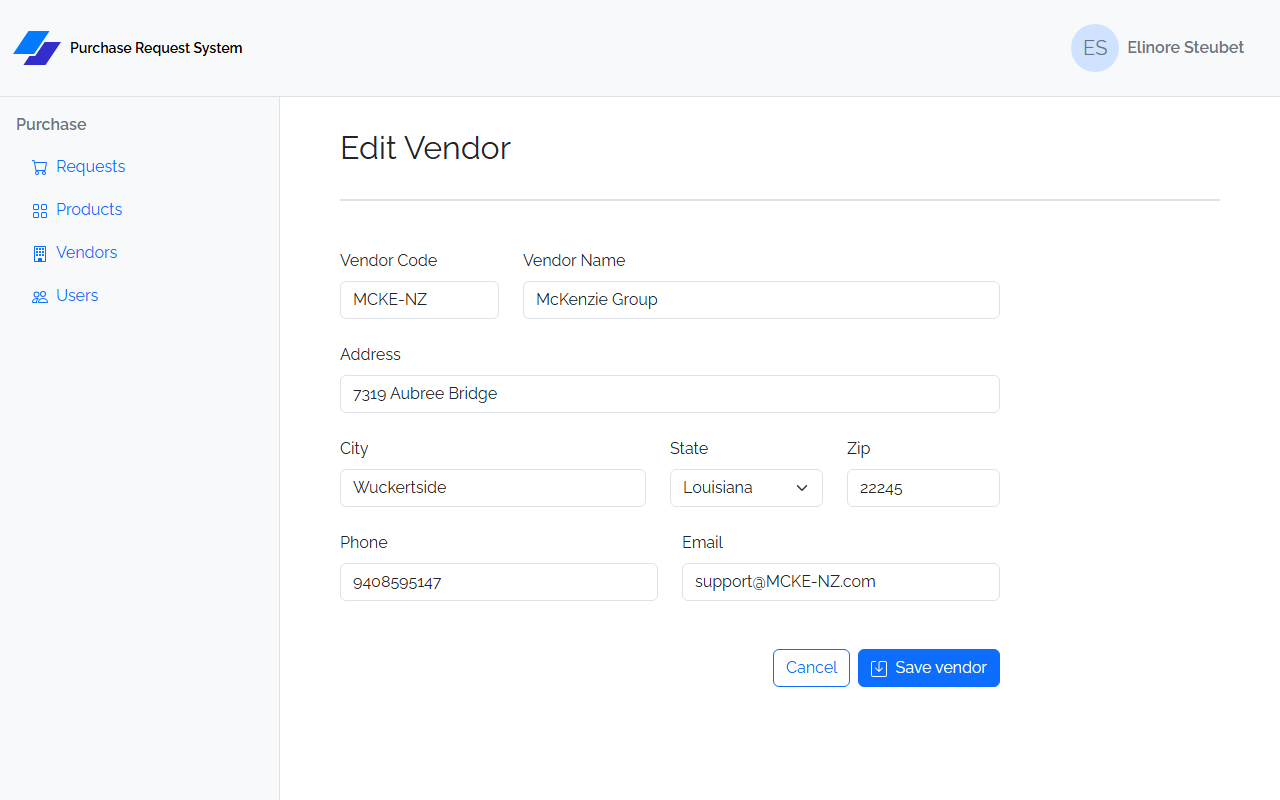
| Field | Input | Validation |
|---|---|---|
| Vendor Code | text | Required; max 7 characters |
| Vendor Name | text | Required |
| Address | text | Required |
| City | text | Required |
| State | select | Required; full list of US states; stores 2-letter abbreviation |
| Zip | text | Required |
| Phone | text | Optional |
| Optional |
On save: navigates to /vendors.
Users List (/users)
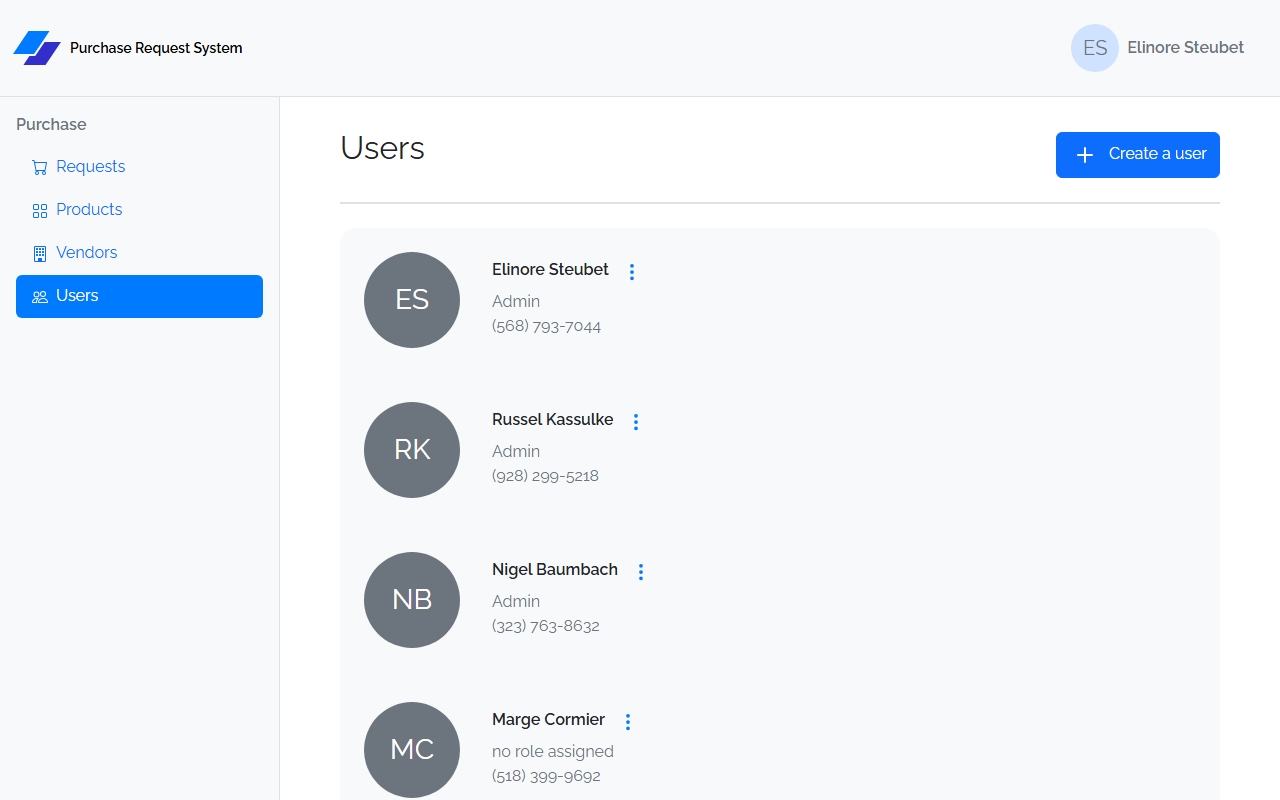
Header: "Users" heading + Create a user button → /users/create
Displays users as a card grid. Each card shows:
- Avatar circle with initials (first + last initial)
- Full name
- Role: Admin, Reviewer, or no role assigned (Admin takes priority when both flags are true)
- Phone (formatted)
- Three-dots dropdown: Edit → /users/edit/:id, Delete (with confirm dialog)
User Create (/users/create) / User Edit (/users/edit/:id)
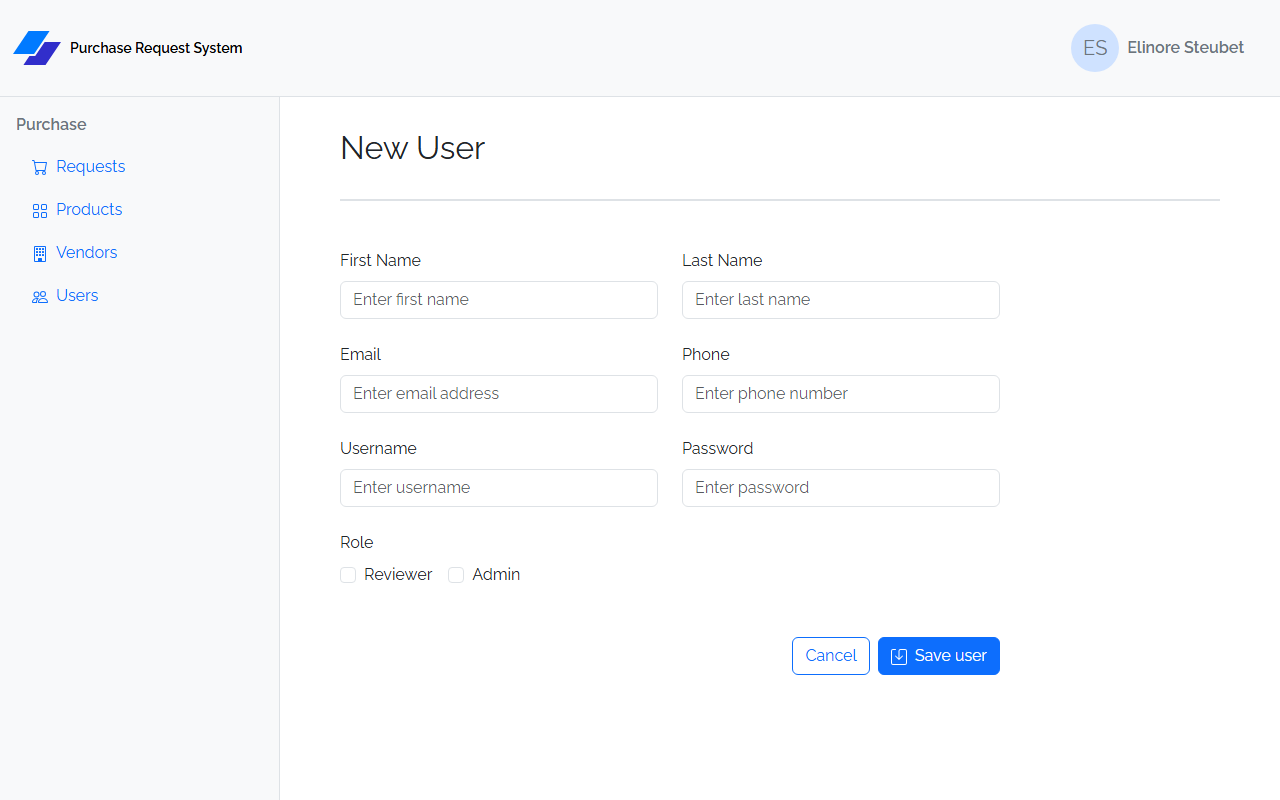
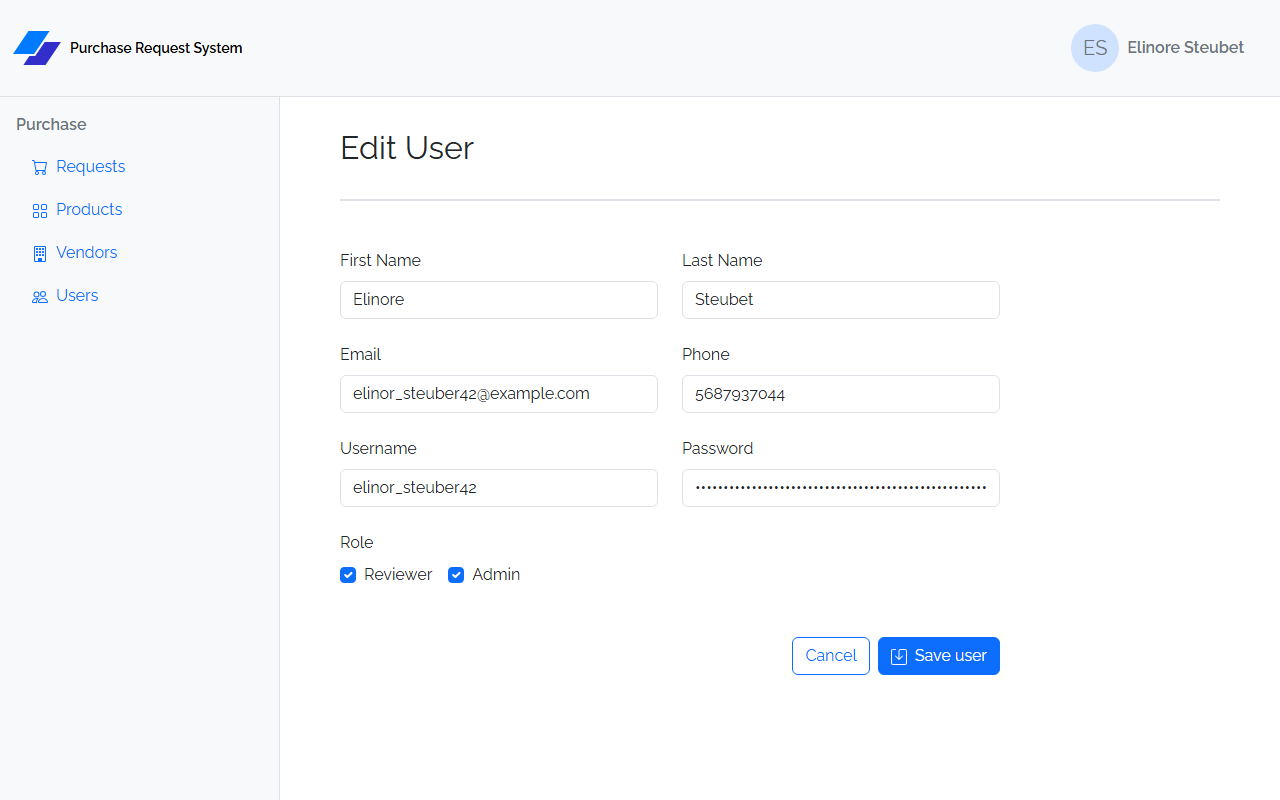
| Field | Input | Validation |
|---|---|---|
| First Name | text | Required |
| Last Name | text | Required |
| Optional | ||
| Phone | text | Optional |
| Username | text | Required; max 50 characters |
| Password | password | Required; max 60 characters (bcrypt hash length) |
| Reviewer | checkbox | Optional; maps to IsReviewer |
| Admin | checkbox | Optional; maps to IsAdmin |
On save: navigates to /users.
Static Design Project
The HTML/CSS capstone builds every PRS page above as static HTML/CSS + Bootstrap (the Vite scaffold from the HTML/CSS pass). The page layouts, fields, and buttons are exactly as described under Frontend — Prs.Web — use those as your visual target. Two things are specific to the static build:
- Content is hardcoded from the provided sample data — nothing is fetched. Each page shows realistic rows and values so it matches its reference screenshot.
- Forms validate on submit using a small shared script,
js/validation.js, from HTML/CSS Lesson 6. Submitting an incomplete form reveals the error state — the sameis-invalid+.invalid-feedbackmarkup React'sreact-hook-formproduces later, so the React capstone is a straight conversion.
Card layouts (list pages)
The three card-grid list pages don't share one card technique — each item's width is set per element (an inline style or a utility class), never in the stylesheet, and Users isn't a Bootstrap card at all. Match each page to the reference:
| Entity | Item markup | Card? | Width |
|---|---|---|---|
| Products | <div class="card" style="width: 23rem"> |
Bootstrap .card |
23rem (inline) |
| Vendors | <div class="card w-25"> |
Bootstrap .card |
w-25 (25% utility) |
| Users | <div class="d-flex gap-4" style="width: 25rem"> + avatar circle + <address> |
not a card | 25rem (inline) |
The user "card" is really a flex row: a 6rem avatar circle (rounded-circle) beside an <address> holding the name, role, and phone. It reads as a contact block (semantic <address>), which is why it drops the .card box — this is the avatar-circle-with-initials pattern.
Colors
The design is almost entirely stock Bootstrap 5 — the only custom values are one brand blue, a logo indigo, the Sign In gradient, and the Raleway font. Everything else comes from Bootstrap utility classes.
Custom (non-Bootstrap) values
| Value | Used for | Defined in |
|---|---|---|
#007AFF (bright "system blue") |
Link color, active nav pill, action-icon fills (edit / add / ⋮ / save), the logo's primary shape | css/styles.css (--bs-link-color-rgb: 0,122,255, .nav-pills active) + inline fill= |
#312ECB (indigo) |
The logo's second shape only | inline in signin.html |
#D6F2FF → #EDFAFF (light-blue radial gradient) |
Full-page background of the Sign In page | css/styles.css .signin |
Raleway (weights 400 / 600) |
App-wide font | css/styles.css @import (Google Fonts) |
Two blues: links and icons use the custom
#007AFF, but buttons (btn-primary) and the Vendor card's accent bar stay Bootstrap's default#0d6efd—--bs-primaryis never overridden.
Backgrounds (all Bootstrap utilities)
| Surface | Class / value |
|---|---|
| Page body | white (default) |
| Header bar & left nav | bg-body-tertiary (very light gray); active nav pill = #007AFF bg + white text |
| Sign In page | light-blue radial gradient (.signin) |
| Card-grid panel — Products / Vendors / Users | bg-light |
| Requests list panel | bg-body-tertiary |
| User avatar circle | bg-secondary + text-white initials |
| Header signed-in avatar | bg-primary-subtle + text-secondary |
| Product card — top accent bar (30%) + part-number badge | bg-primary-subtle (light blue) |
| Vendor card — top accent bar (60%) | default progress-bar, no bg- class → Bootstrap primary blue #0d6efd |
Text — default body #212529; muted secondary via text-secondary / text-body-secondary (justification, delivery mode, role, phone); text-white on avatars and primary buttons.
Semantic — status badges: NEW text-bg-primary (blue), REVIEW text-bg-warning (yellow), APPROVED text-bg-success (green), REJECTED text-bg-danger (red). Buttons: btn-primary / btn-outline-primary (blue); btn-outline-danger (Reject, Cancel Order) and btn-danger (delete-confirm) for destructive actions; btn-light (transparent) for the ⋮ dropdown toggles. Other badges: Vendor code = badge bg-secondary (gray); Product part-number = badge text-secondary bg-primary-subtle (light blue).
Wiring validation
Your PRS design starter includes js/validation.js, already linked on every page (<script src="/js/validation.js">) — if your copy predates it, create it from the Lesson 6 guide and link it. Then, on each form:
- Add
novalidateanddata-success="/…"(where a valid submit navigates) to the<form>. - Add
required, plus an.invalid-feedbackmessage, to each required control. - Add
min="1"to Quantity, and nativemaxlength="N"where a length cap applies. - Leave disabled controls (Requested By; Status on Create) and optional fields (Email, Phone) unvalidated.
required and min are checked on submit (the control turns red and its message appears); maxlength is a native attribute that simply blocks over-long input.
Required validations
Every rule below must be implemented and visible on an empty/invalid submit. The messages match the React app so the static pages and the React capstone read identically.
| Page / Form | Field | Rule | Message |
|---|---|---|---|
| Sign In | Username | required | Username is required |
| Sign In | Password | required | Password is required |
| User Create / Edit | First Name | required | First name is required |
| User Create / Edit | Last Name | required | Last name is required |
| User Create / Edit | Username | required · maxlength 50 |
Username is required |
| User Create / Edit | Password | required · maxlength 60 |
Password is required |
| Vendor Create / Edit | Vendor Code | required · maxlength 7 |
Code is required |
| Vendor Create / Edit | Vendor Name | required | Name is required |
| Vendor Create / Edit | Address | required | Address is required |
| Vendor Create / Edit | City | required | City is required |
| Vendor Create / Edit | State | required | State is required |
| Vendor Create / Edit | Zip | required | Zip is required |
| Product Create / Edit | Product Number | required · maxlength 20 |
Number is required |
| Product Create / Edit | Product Name | required | Name is required |
| Product Create / Edit | Price | required | Price is required |
| Product Create / Edit | Unit | required | Unit is required |
| Product Create / Edit | Vendor | required | Vendor is required |
| Request Create / Edit | Description | required | Description is required |
| Request Create / Edit | Justification | required | Justification is required |
| Request Create / Edit | Delivery Method | required | Delivery method is required |
| Request Edit only | Status | required | Status is required |
| Request Line Create / Edit | Product | required | Product is required |
| Request Line Create / Edit | Quantity | min 1 |
Quantity must be at least 1 |
| Request Detail — Reject modal | Rejection Reason | required | Rejection reason is required |
Fields not listed — Email, Phone, and the disabled Requested By and Create-page Status selects — are not validated.
Peer review of the static design compares each form's empty-submit error state against the reference screenshots.