Lesson 6 Lab — Validating the Order Item Form
Reinforce the validation pattern from the guide on a form with the two pieces the guide
didn't cover: a required dropdown and a numeric minimum. You'll wire the
Order Item create and edit forms to js/validation.js so submitting an incomplete
item reveals the error state. Refer back to the guide for the is-invalid /
.invalid-feedback markup and the script — they're not restated here.
End goal. Submitting a blank Order Item form shows "Menu item is required" under the dropdown and "Quantity must be at least 1" under the Quantity field; choosing an item and setting a quantity of 1+ navigates to the order detail.
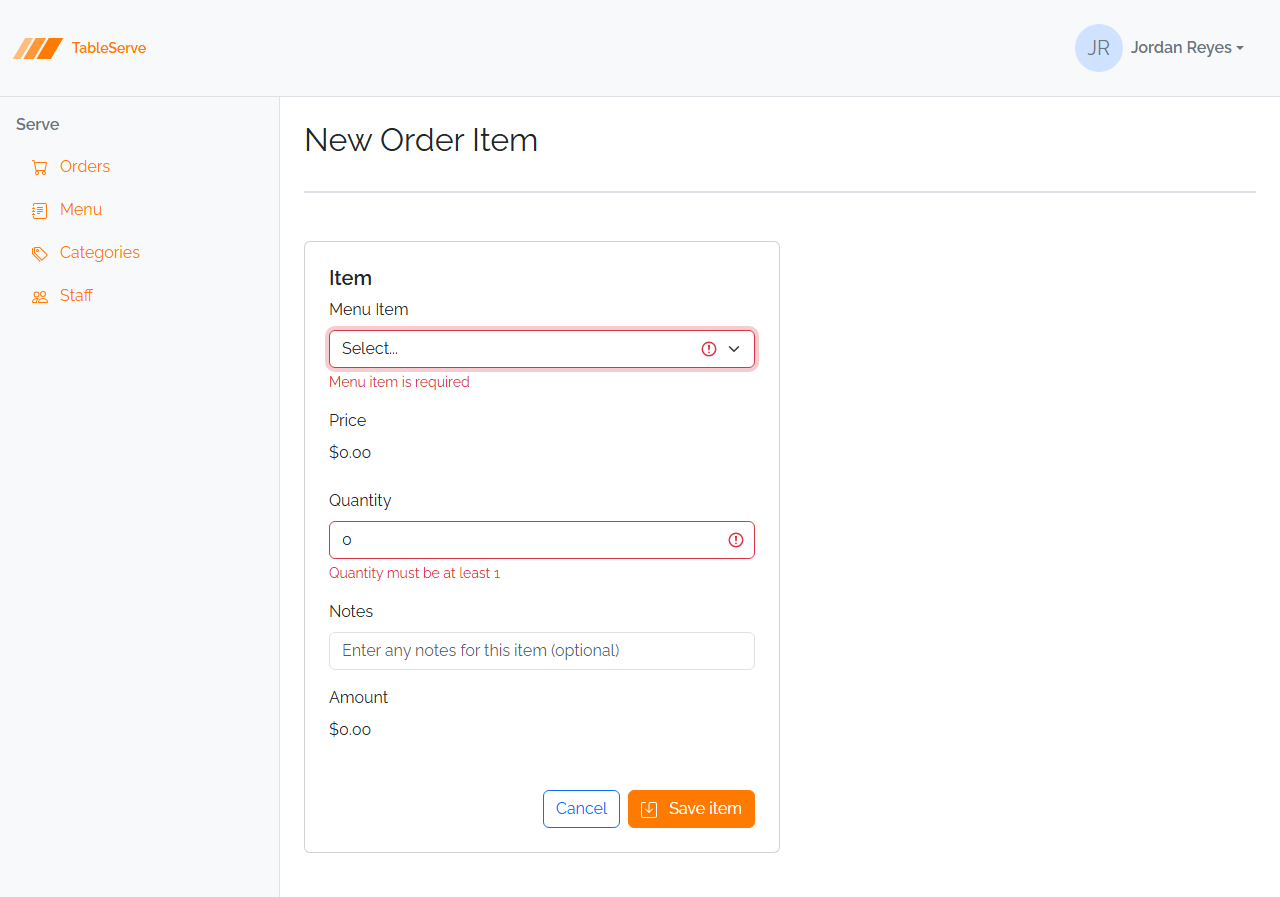
Part A — orderitem-create.html
The Menu Item select is required, and Quantity has a minimum of 1. Price, Amount, and Notes stay as they are (Price/Amount are display-only; Notes is optional).
- Make the dropdown required and give it a message slot. A required
<select>needs an empty-value placeholder so "nothing chosen" counts as empty — change the placeholder option's value from0to"": - Give Quantity a minimum of 1 and a message slot — hardcode the message in the div, exactly like the required fields in the guide:
- Wire the form — the Save item button is already
type="submit", and the<script src="/js/validation.js">tag is already linked on the page:
Part B — orderitem-edit.html
- Apply the same three edits to the edit form:
required+ empty-value placeholder + message slot on the dropdown,min="1"+ a hardcoded message slot on Quantity, andnovalidate data-success="/order-detail.html"on the form (the script tag is already linked). - Leave the pre-filled
values alone — the edit form already has aselectedmenu item and a real quantity, so a valid submit sails straight through to the order detail.
Verify in the browser
Browser checks work like the guide's section 8. With npm run dev running:
/orderitem-create.html— click Save item without touching anything. The Menu Item dropdown goes red with "Menu item is required" and Quantity goes red with "Quantity must be at least 1" (itsvalueis0, below the minimum).- Choose a menu item and set Quantity to
1or more, then Save item — it navigates to/order-detail.html. /orderitem-edit.html— Save item submits immediately (it's pre-filled and valid). Clear the Quantity or set it to0and resubmit to see theminmessage return.- Open DevTools → Elements and watch
is-invalidget added and removed as you submit. Check the Console for a404on/js/validation.js.
Same validation pattern, one required select and one numeric minimum — on PRS this is the
RequestLine form (required Product dropdown, Quantity min of 1), and you'll wire
js/validation.js into every PRS form the same way in the capstone. Your validated pages
are what your peers review against the error-state screenshots.
Capstone note — wire
js/validation.jsinto every PRS form. Your PRS design starter includesjs/validation.js, already linked on every page (if your copy predates it, create it from the Lesson 6 guide and link it). Wire it into all of them — Sign In, User / Vendor / Product / Request create & edit, the RequestLine form, and the Reject modal. The exact field-by-field rules are in PRS requirements → Static Design Project.
Stretch challenges
Optional — for when you finish early. Not needed for the capstone. [Reinforce] builds on what you just did; [Reach] goes past the guide and needs some research.
- Validate the Order form — [Reinforce] — wire
order-create.htmlandorder-edit.html: make Table Number required (with a message anddata-success="/orders.html"), so every Order-related form now validates. - Sweep the rest of the app — [Reinforce] — add the
requiredmarkup,novalidate, and the script to the remaining forms (menuitem-create/edit,category-create/edit,staff-edit) so no form in the app submits empty. This is the same sweep you'll run across the PRS forms. - Prove client validation is only a convenience — [Reach] — in DevTools, disable JavaScript (Command Palette → "Disable JavaScript") and submit a blank form: it navigates with no validation at all. That's why a real app must also validate on the server. Not covered in the guide — read Client-side form validation (MDN).
- Green "valid" state — [Reach] — Bootstrap also has
is-valid+.valid-feedbackfor confirming a correct field. Add it to one field so a valid entry shows green. (Note: the PRS React app doesn't use this — it only flags errors — so keep it as an experiment.) Not covered in the guide — Bootstrap validation styles.