Lesson 1 Guide — How Web Apps Talk: Architecture, HTTP & Insomnia
Goal: by the end of this lesson you understand what you're about to build and why — where a Web API sits in a modern web application, how the browser and server talk over HTTP, what REST, JSON, and status codes are, and how to send and read requests with Insomnia. No C# yet — this lesson is the mental model everything else in the pass hangs on.
The general pattern you're learning: a modern web app is split into a front end (runs in the browser) and a back end API (runs on a server, owns the data). They communicate by the front end sending HTTP requests and the API returning JSON with a status code. Every controller you write for the rest of this pass is one end of that conversation.
No project or reference code this lesson. You won't open Visual Studio. You'll use the browser's DevTools and Insomnia to observe the conversation your API will later join. (Because there's no code to build, this lesson has no finished reference implementation — it deliberately comes before the build.)
1. Where a Web API fits
You're about to build the back end of a web application. To know what that means, look at the whole shape first.
A web application has to do two jobs: render a user interface and manage data. Where those jobs happen is what separates the architectures:
- Traditional server-rendered apps (Rails, Django, classic ASP.NET MVC) — the server builds a full HTML page for every click and sends it to the browser. The browser mostly just displays pages.
- Single-Page Applications (SPAs) (React, Vue, Angular) — the browser downloads a JavaScript app once, and from then on that app renders the UI itself and fetches only data from the server as needed. This is client-side rendering (CSR) — the rendering happens on the client.
This course builds an SPA: a React front end (Pass 3) and the Web API back end you're starting now. The API's entire job is data — it never sends HTML. The React app asks it for JSON and draws the screens.
Traditional:   Browser ──click──▶ Server builds a whole HTML page ──▶ Browser shows it

SPA (this course):
   Browser downloads the React app once, then:
   React app ──HTTP request──▶  Web API  ──query──▶  Database
             ◀──── JSON ───────           ◀── rows ──
   React app renders the screen from the JSON
That's the SPA in short: the browser loads a shell plus JavaScript once, then its AJAX requests come back as JSON from the Web API — the piece you're building (in this course, a C# / ASP.NET Core Web API).
For a fuller treatment of where rendering can happen (server, client, or build time) and why SPAs became popular, read Web Application Architecture (handsonreact.com) — a short page that lays out the same split in more detail.
2. See it happening — XHR in the wild
This background "ask for data, get JSON" conversation is happening on nearly every site you use. You can watch it live:
- Open a data-heavy site in the browser — a news feed, a weather page, an online store, anything that loads more content as you scroll or search. (Big apps like Netflix do this constantly, though they need a login; a public store or news site shows it just as well.)
- Open DevTools (F12) → Network tab → click the Fetch/XHR filter.
- Interact with the page — scroll, search, open an item. Watch new requests appear.
- Click one. Look at its request (a URL and a verb) and its response — very often a block of JSON, exactly like what your API will return.
That's the whole idea: the page you see is the front end; those background calls are it talking to a back end. You're about to build the thing on the other end of those calls.
3. HTTP — a request, then a response
Every one of those calls is HTTP: the client sends a request, the server sends back a response. Here's the anatomy of both:
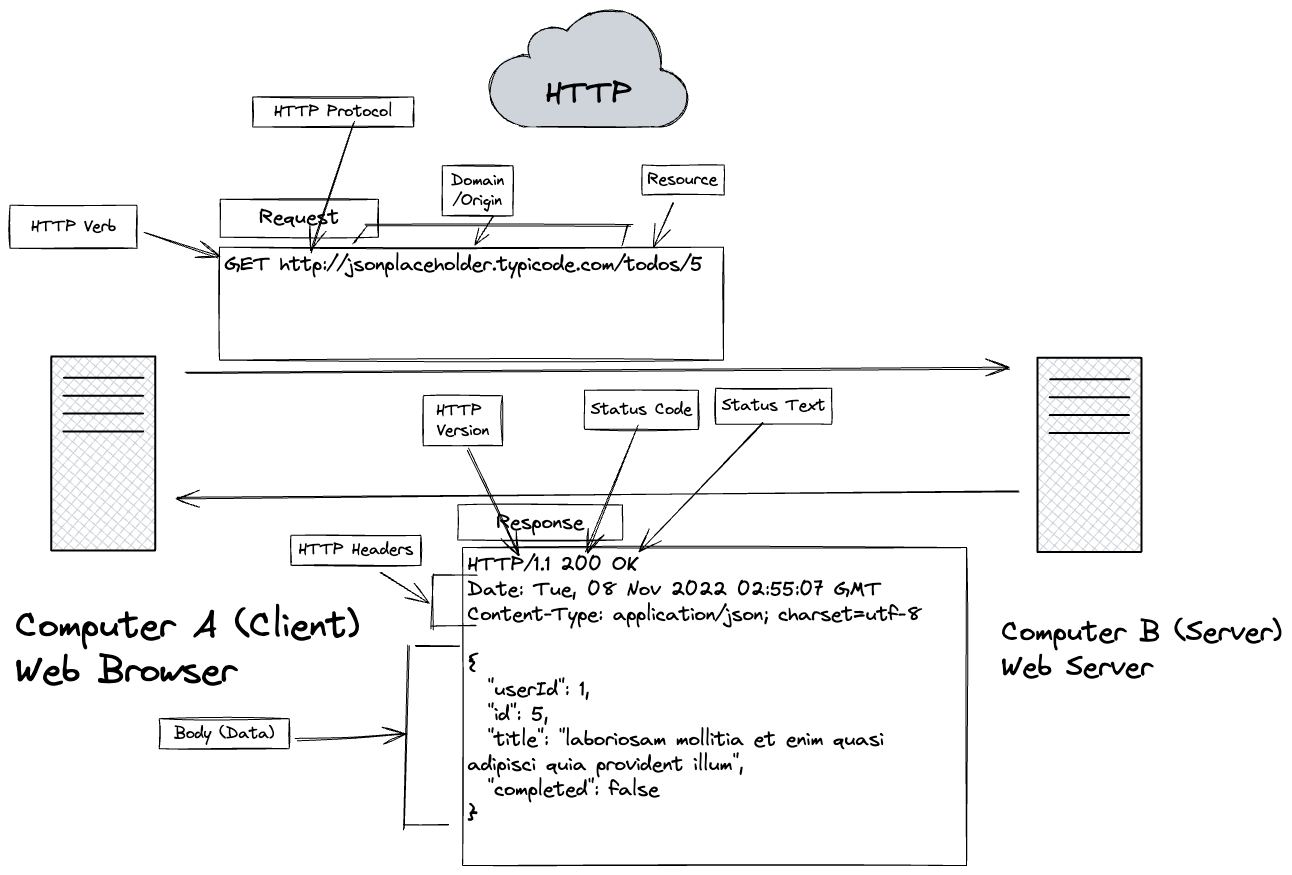
A request has a verb (the action), a URL (protocol + domain + resource path), optional headers, and — for writes — a body. A response has a status code (the outcome), headers, and a body (usually JSON).
The four verbs you'll use:
| Verb | Means | Example |
|---|---|---|
GET |
read | GET /api/staff |
POST |
create | POST /api/staff |
PUT |
update | PUT /api/staff/5 |
DELETE |
delete | DELETE /api/staff/5 |
4. REST & JSON
REST is the convention of modelling everything as resources (nouns) addressed by URL, acted on with those four verbs:
- Collection:
/api/orders— all orders. - One item:
/api/orders/5— the order with id 5. - A custom action (this course's convention, id before verb):
/api/orders/5/cancel.
The data itself is JSON — "key": value pairs, which can nest:
{
  "id": 5,
  "tableNumber": 12,
  "status": "PLACED",
  "orderItems": [
    { "id": 1, "quantity": 2, "menuItem": { "name": "Loaded Nachos" } }
  ]
}
Your API's job is to turn database rows into JSON like this and hand it back.
5. Status codes — the outcome in a number
Every response carries a three-digit status code. Grouped into five families:
| Family | Meaning |
|---|---|
| 1xx | Informational |
| 2xx | Success — it worked |
| 3xx | Redirection — look elsewhere |
| 4xx | Client error — your request was wrong |
| 5xx | Server error — the server broke |
200  →  "All went well."             2xx — success
400  →  "It's YOUR fault."           4xx — client error  (fix your request)
500  →  "It's the SERVER's fault."   5xx — server error  (not you)
The mental model: 2xx = all good, 4xx = you messed up the request, 5xx = the server messed up. The specific codes this course's API returns:
| Code | Text | When |
|---|---|---|
| 200 | OK | successful GET / PUT |
| 201 | Created | successful POST |
| 204 | No Content | successful DELETE |
| 400 | Bad Request | malformed request |
| 404 | Not Found | no resource with that id |
| 500 | Internal Server Error | unhandled exception |
Here's what each looks like in practice:
GET    /api/staff/1      → 200 OK          body: { "id": 1, "firstName": "Jordan", ... }
POST   /api/staff        → 201 Created     body: the new staff + a Location header
DELETE /api/staff/12     → 204 No Content  body: (empty)
GET    /api/staff/9999   → 404 Not Found
POST   /api/staff        → 400 Bad Request (the request body was invalid)
(any)                    → 500 Internal Server Error (an unhandled exception on the server)
(Codes like 401 Unauthorized exist for APIs that require a login — this course has no
authentication, so you won't see them here.)
The full list lives in the HTTP, REST, JSON & Status Codes cheat sheet — bookmark it.
6. Insomnia — testing an API without a front end
Before there's any React app, how do you call your API to see if it works? With Insomnia — a desktop app that sends HTTP requests and shows you the responses. It's how you'll verify every endpoint in this pass.
The loop is simple: pick a verb and URL, add a body if needed, hit Send, read the status code and JSON that come back.
The five things you'll do map straight to CRUD:
| In Insomnia | Verb | Example |
|---|---|---|
| Create | POST |
POST /api/menuitems with a JSON body |
| Read | GET |
GET /api/menuitems or GET /api/menuitems/5 |
| Update | PUT |
PUT /api/menuitems/5 with a JSON body |
| Delete | DELETE |
DELETE /api/menuitems/5 |
| List / filter | GET |
GET /api/orders?status=PLACED |
Try it now, against a public API
You don't need your own API yet — practice the mechanics against a free live one:
- Install Insomnia from insomnia.rest and open it.
- Create a new GET request with the URL
https://jsonplaceholder.typicode.com/todos/5. - Hit Send. You should get a
200 OKand a small JSON object in the response panel — the same request from the anatomy diagram in section 3. - Change the
5to99999and Send again — still200, but notice how the body changes. Try a nonsense path like/todosXYZand watch the status change to404.
That request/response loop — pick a URL, Send, read the status and JSON — is exactly how
you'll verify your TableServe endpoints starting next lesson. Full set-up for the
TableServe collection (import + baseUrl) is in the Lesson 2 guide and the
Insomnia quick-start cheat sheet.
7. Verifying your understanding
There's no code to run — you verify by observing:
- In the browser Network tab (Fetch/XHR filter), you can point at a real request on a live site and name its verb, its URL, its status code, and whether its response is JSON.
- In Insomnia, you sent a
GETto jsonplaceholder and got a200with a JSON body — and produced a404by asking for something that isn't there. - You can explain, in a sentence, why this course's API returns JSON, not HTML (because the React front end renders the UI; the API only provides data).
The General Pattern (what to take away)
- A modern web app splits into a front end (renders UI in the browser) and a back end API (owns the data). This course builds the API.
- The two talk over HTTP: a request (verb + URL + optional body) gets a response (status code + JSON body).
- REST models data as resources at URLs, acted on with GET/POST/PUT/DELETE; the data format is JSON.
- Status codes report the outcome — 2xx success, 4xx your fault, 5xx the server's fault.
- Insomnia lets you send requests and read responses with no front end — your verification tool for the whole pass.
Keep the two cheat sheets handy: HTTP/REST/status codes and Insomnia quick-start.
Build Steps
There's nothing to build — this lesson is exploration. Do these to lock it in (the full version is this lesson's lab):
- Open a data-heavy website, open DevTools → Network → Fetch/XHR, interact with the page, and find one background request. Note its verb, URL, and status code, and check whether its response is JSON.
- Install Insomnia.
- Send a
GETtohttps://jsonplaceholder.typicode.com/todos/5and confirm a200 OKwith a JSON body. - Deliberately trigger a
404by requesting a resource that doesn't exist. - Skim both cheat sheets so you know where to look things up during the pass.