Lesson 5 Lab — Order Form, Order Item Edit, and Delete Modals
Reinforce the form, nested-form, and modal patterns from the guide by building the Order Create/Edit form, the Order Item Edit page, and the delete confirmation modals that your list pages have been pointing at since Lesson 4. Refer back to the guide for the form and modal markup.
End goal. Build toward the finished pages shown under each part below — work out the classes from the guide's patterns; they're not restated here.
Part A — order-create.html and order-edit.html
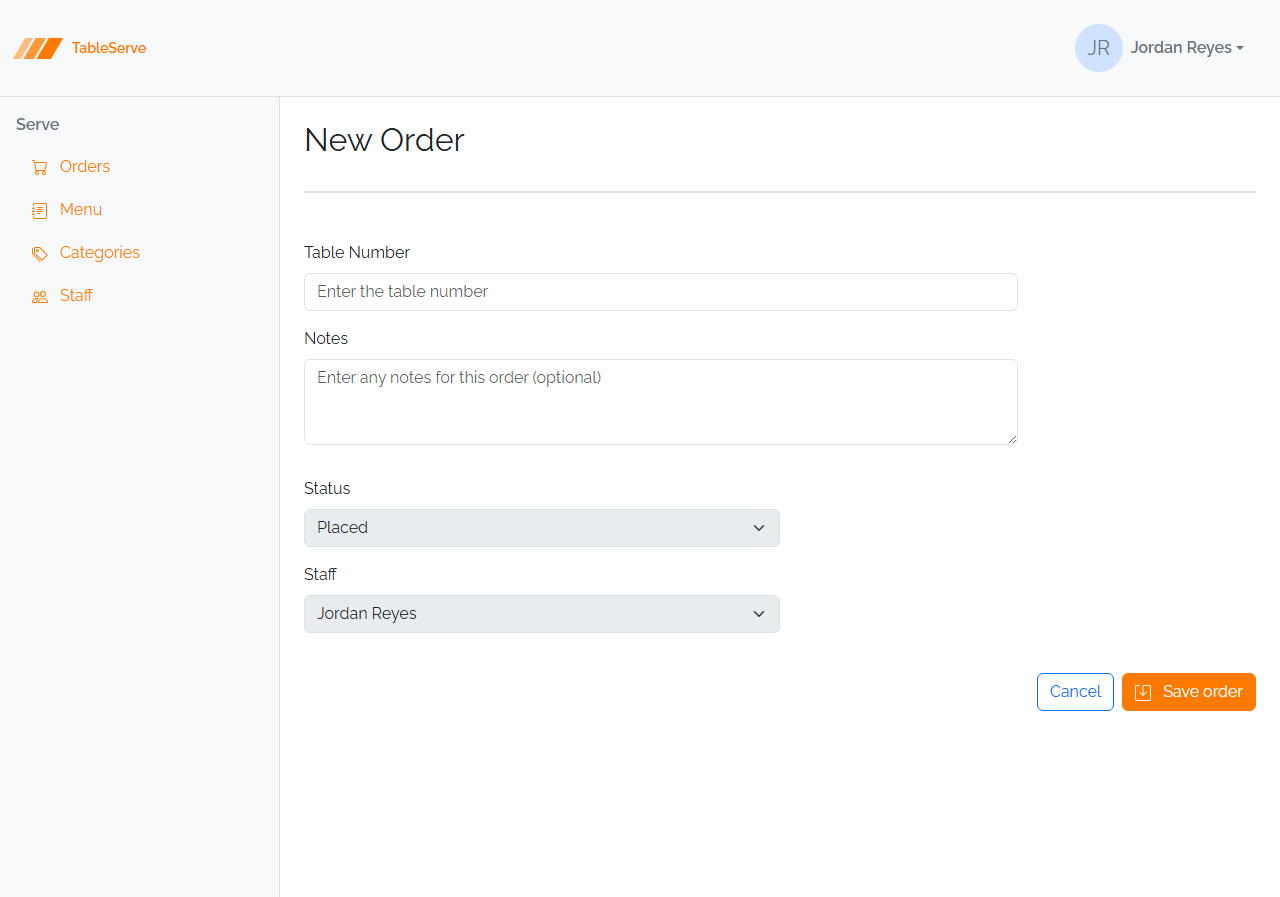
The Order form is a simple shared form — no FK dropdown, no derived fields. An order has just a Table Number (required, numeric) and Notes (optional).
- Create
order-create.htmlwith the standard shell and an "New Order" heading. - Add a form (
d-flex flex-wrap w-75 gap-2) with: - Table Number —
<input type="number" class="form-control">in amb-3 - Notes —
<textarea class="form-control">in amb-3(optional) - A right-aligned row: Cancel (
<a>back to/orders.html) + Save button (#saveicon) - Create
order-edit.htmlas the same form with pre-filledvalues (Table Number) and text inside the<textarea>, titled "Edit Order".
Part B — orderitem-edit.html
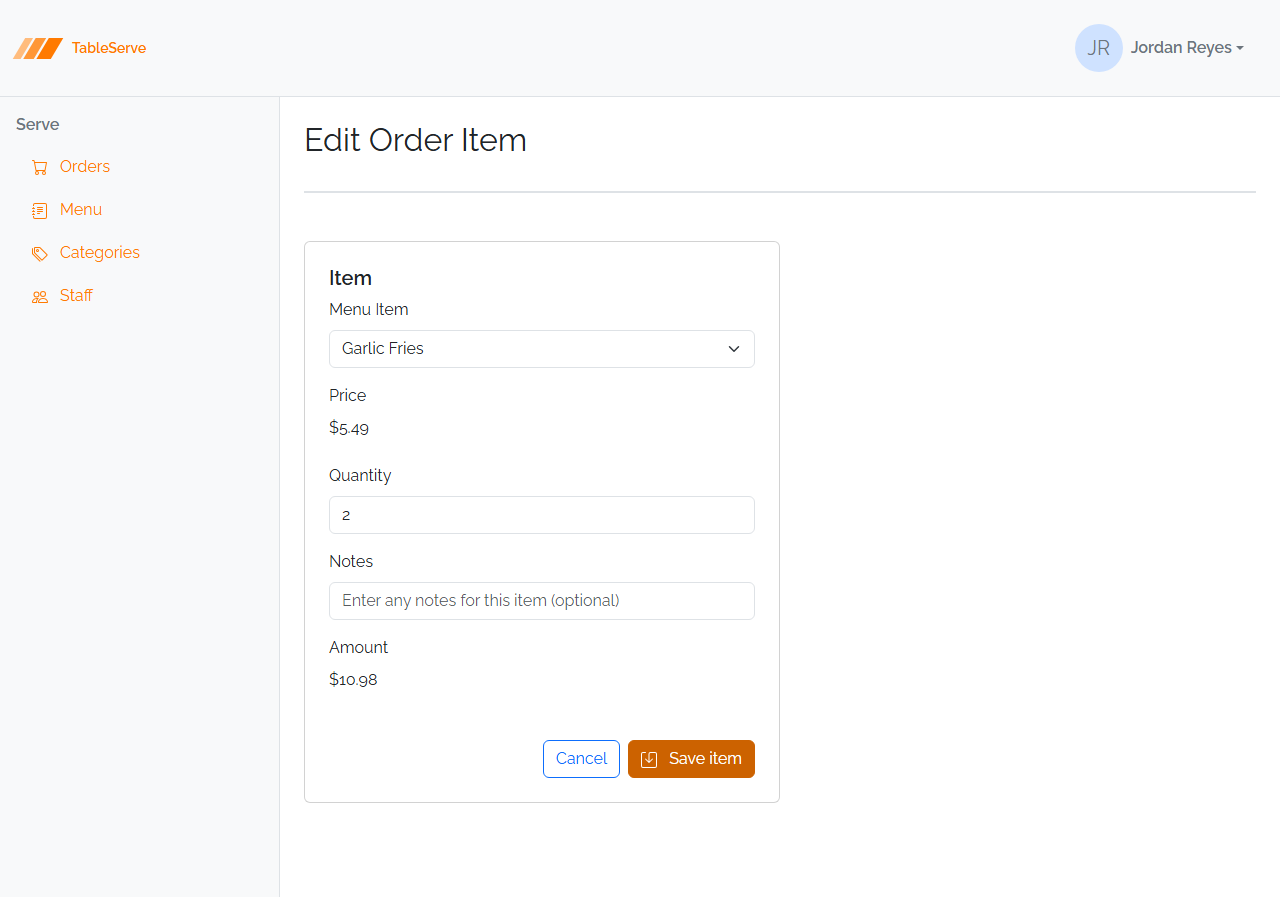
The guide built orderitem-create.html. Build its edit twin — same nested child
form, pre-filled.
- Copy the Order Item form from the guide (Menu Item dropdown, display-only Price, Quantity, Notes, display-only Amount).
- Pre-fill it: mark the ordered menu item's
<option selected>, show a real Price (e.g.$24.99), set the Quantityvalue, fill Notes, and show the computed Amount. - Title it "Edit Order Item"; keep Cancel returning to
/order-detail.html.
Part C — wire up the delete modals
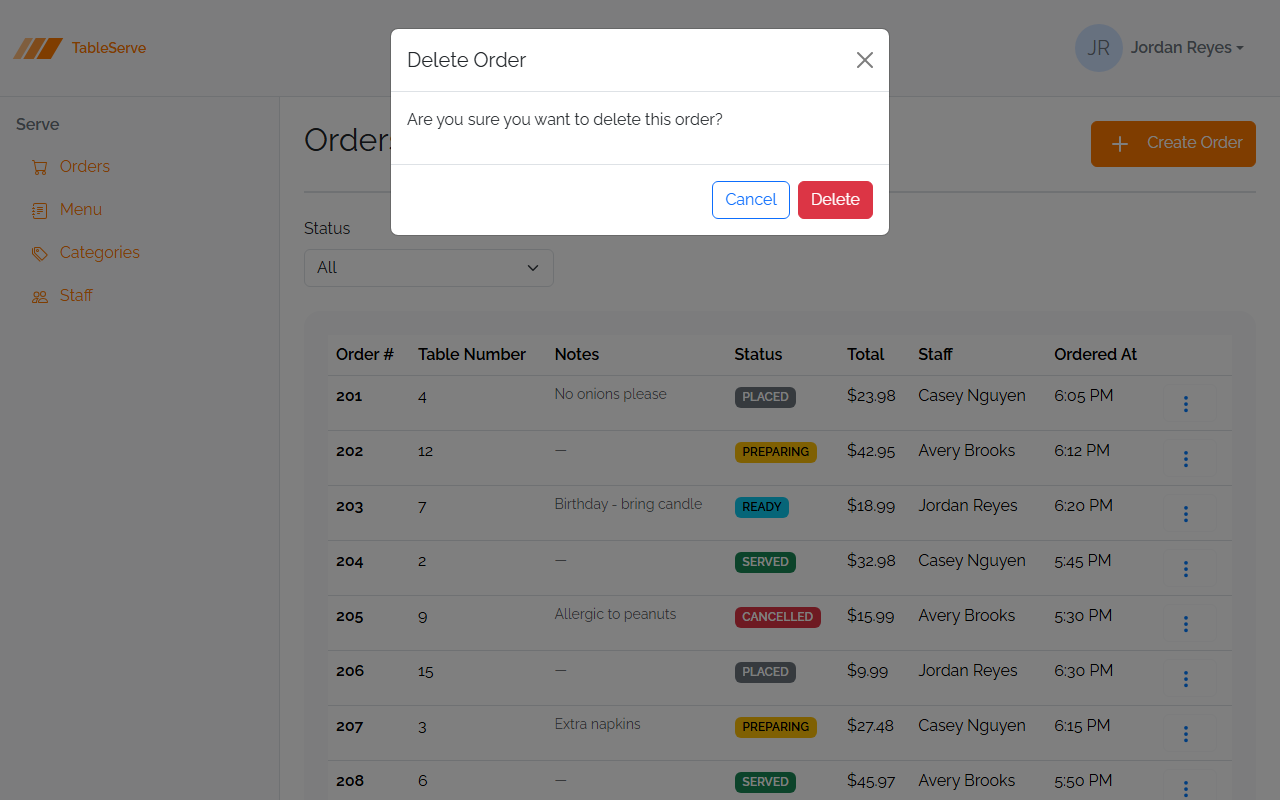
Your menuitems.html, orders.html, and staff.html pages have Delete links that
data-bs-target a modal — but you never built the modals. Add them now.
- To each of those three pages, add a delete confirmation modal (guide section
5a) with the matching
id: menuitems.html→#deleteMenuItemModal("Delete Menu Item")orders.html→#deleteOrderModal("Delete Order")staff.html→#deleteStaffModal("Delete Staff")- Confirm
orderCreate,orderEdit, andorderitemEditare invite.config.js.
Verify in the browser
Browser checks are covered in the guide — section 8. With npm run dev running:
/order-create.html— Table Number and Notes fields, buttons pushed right; Cancel returns to the orders list./order-edit.html— same form, pre-filled./orderitem-edit.html— the nested form with aselectedmenu item and pre-filled Quantity/Notes; Cancel returns to the order detail.- On
/menuitems.html,/orders.html, and/staff.html, open a⋮menu and click Delete — the confirmation modal should now open (before this it did nothing). Dismiss with Cancel and the ✕. - Check the Console for 404s.
Same modal and shared-form patterns on different entities — on PRS you'll build the Request form, the RequestLine edit form, and delete modals across every list page the same way.
Stretch challenges
Optional — for when you finish early. Not needed for the capstone. [Reinforce] builds on what you just did; [Reach] goes past the guide and needs some research.
- Build every workflow state — [Reinforce] — save copies of
order-detail.htmlfor each status (Placed, Ready, Served, Cancelled) showing the correct advance button per the guide's table — and on the Cancelled copy, add the Cancellation Reason to the summary. This is the manual version of the conditional rendering you'll write in React. - Peek ahead at live validation — [Reinforce] — the Cancel modal's required textarea
has an
.invalid-feedbackmessage that stays hidden. Addis-invalidto the textarea by hand, save, and watch the message appear; remove it and it's gone. That single class is the whole error state — Lesson 6 makes it happen automatically on submit across every form. - Static "Add Item" preview — [Reinforce] — on
order-detail.html, add one more Order Item row and update the footer Total by hand, proving you understand the Amount = Price × Quantity and Total = sum-of-Amounts relationships you'll compute in code later. - Delete-in-modal for the detail page — [Reinforce] — add an order-level delete
button to
order-detail.html's heading that opens a#deleteOrderModal, so the detail page can delete the whole order, not just its items.
Finished these and want more? See stretch-html-css-challenges.md for bigger challenges that span the whole HTML/CSS pass.